주요 콘텐츠로 건너뛰기

Samsung SmartCam HD Pro Speaker Replacement

필요한 것

  1. Samsung SmartCam HD Pro Speaker Replacement, Casing: 1 단계, 이미지 1개 중 1개
    • Locate a small opening around the front panel of the camera.

  2. Samsung SmartCam HD Pro Speaker Replacement: 2 단계, 이미지 1개 중 1개
    • Using a plastic opening tool, apply pressure to various points around the camera to pry open the front panel.

  3. Samsung SmartCam HD Pro Speaker Replacement: 3 단계, 이미지 1개 중 1개
    • Remove both of the connecting wires from the motherboard.

    • Be careful to not bend headers or damage the wires.

  4. Samsung SmartCam HD Pro Speaker Replacement: 4 단계, 이미지 1개 중 1개
    • Apply a plastic opening tool to the gray plastic band around the case of the camera. Insert the edge of the spudger between the case of the camera and the gray plastic band.

  5. Samsung SmartCam HD Pro Speaker Replacement: 5 단계, 이미지 1개 중 1개
    • Apply pressure with the plastic opening tool to various areas of the gray plastic band to pry it from the white plastic back of the case.

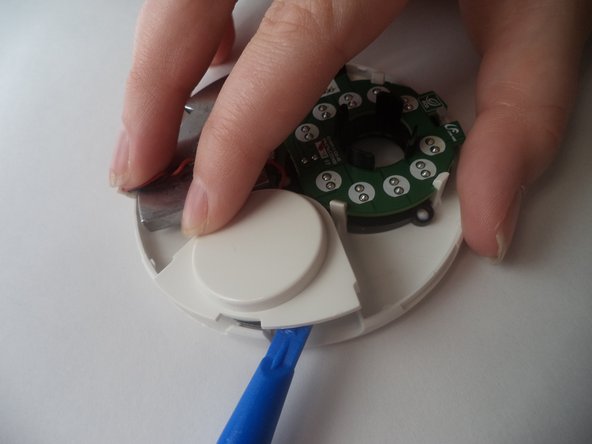
  6. Samsung SmartCam HD Pro Speaker Replacement, Speaker: 6 단계, 이미지 1개 중 1개
    • Insert plastic opening tool below the plastic speaker cover on the inside of the removed front panel of the device.

  7. Samsung SmartCam HD Pro Speaker Replacement: 7 단계, 이미지 1개 중 1개
    • Push the two tabs holding the speaker cover on, while prying it up.

  8. Samsung SmartCam HD Pro Speaker Replacement: 8 단계, 이미지 1개 중 1개
    • Pull out the speaker which is now loosely resting in its plastic housing.

결론

To reassemble your device, follow these instructions in reverse order.

작성자

2다른 기여자 명과 함께

AllisonBridges

회원 가입일: 01/18/17

501 평판

안내서 5개를 작성함

0가이드 댓글

댓글 쓰기

조회 통계:

지난 24시간: 0

지난 7일: 0

지난 30일: 5

전체 시간: 335