주요 콘텐츠로 건너뛰기

Sony Alpha NEX-6 Control Wheel Replacement

필요한 것

  1. Sony Alpha NEX-6 Control Wheel Replacement, Battery: 1 단계, 이미지 1개 중 1개
    • Prior to operating on this device, be sure the camera is turned OFF. With power, the camera can be a dangerous device to work with.

    • Turn the camera off by switching the power knob "OFF" text to the white selector dot.

  2. Sony Alpha NEX-6 Control Wheel Replacement: 2 단계, 이미지 1개 중 1개
    • Flip the camera upside-down and carefully place it on a flat surface.

    • With the lens facing outward, locate the battery compartment - indicated by a grooved latch.

    • Push the latch to the right to unlock the battery compartment. The door should flip upward.

  3. Sony Alpha NEX-6 Control Wheel Replacement: 3 단계, 이미지 1개 중 1개
    • With the compartment open, locate a blue tab shown with spudger

    • Press the tab to the side (to the left, or toward the camera wall). This will eject the camera battery.

  4. Sony Alpha NEX-6 Control Wheel Replacement, Battery compartment screws: 4 단계, 이미지 1개 중 1개
    • Remove the two 3.5mm Phillips #00 screws that hold the back case - located inside the battery compartment.

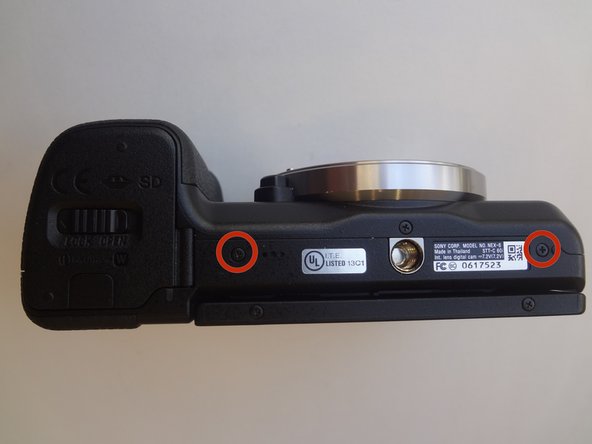
  5. Sony Alpha NEX-6 Control Wheel Replacement, Bottom screws: 5 단계, 이미지 1개 중 1개
    • Remove the two 3.5mm Phillips #00 screws that hold the back case - located on the bottom of the camera.

  6. Sony Alpha NEX-6 Control Wheel Replacement, Side screws: 6 단계, 이미지 1개 중 1개
    • Remove the 3.5 mm Phillips #00 screw on the side of camera - located between the charging and HDMI ports.

    • Remove the 4.0 mm Phillips #00 screw on the side of the camera - located next to the WiFi sign.

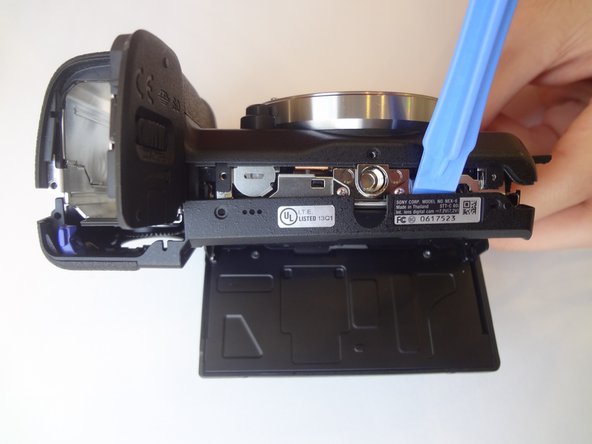
  7. Sony Alpha NEX-6 Control Wheel Replacement, Dis-attaching procedure: 7 단계, 이미지 2개 중 1개 Sony Alpha NEX-6 Control Wheel Replacement, Dis-attaching procedure: 7 단계, 이미지 2개 중 2개
    • Starting with the battery compartment gently begin to separate the back case front the camera.

    • Using a plastic opening tool, separate the bottom of the back case from the camera. Then proceed by separating the sides.

    • Gently lift the back case away from the camera an slide it down to completely remove the back case.

  8. Sony Alpha NEX-6 Control Wheel Replacement, Control Wheel: 8 단계, 이미지 2개 중 1개 Sony Alpha NEX-6 Control Wheel Replacement, Control Wheel: 8 단계, 이미지 2개 중 2개
    • Pry out the ribbon cable by carefully pushing on its side tabs with a spudger.

  9. Sony Alpha NEX-6 Control Wheel Replacement, Control wheel romoval: 9 단계, 이미지 2개 중 1개 Sony Alpha NEX-6 Control Wheel Replacement, Control wheel romoval: 9 단계, 이미지 2개 중 2개
    이 단계에 사용된 도구:
    Tweezers
    $4.99
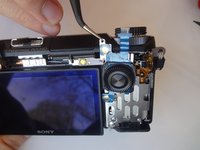
    • Using a spudger, lift the metal locking tab located at the top right corner of control wheel assembly.

    • Using tweezers, carefully slide the assembly up to release it.

결론

To reassemble your device, follow these instructions in reverse order.

다른 5명이 해당 안내서를 완성하였습니다.

작성자

3다른 기여자 명과 함께

Clayton Dale

회원 가입일: 01/20/15

1,067 평판

안내서 7개를 작성함

USF Tampa, Team 11-2, Blackwell Winter 2015 USF Tampa, Team 11-2, Blackwell Winter 2015 회원

USFT-BLACKWELL-W15S11G2

4 회원들

안내서 14개를 작성함

0가이드 댓글

댓글 쓰기

조회 통계:

지난 24시간: 2

지난 7일: 10

지난 30일: 56

전체 시간: 5,514