주요 콘텐츠로 건너뛰기

Sony Cyber-shot DSC-H200 LCD Screen Replacement

필요한 것

  1. Sony Cyber-shot DSC-H200 LCD Screen Replacement, LCD Screen: 1 단계, 이미지 3개 중 1개 Sony Cyber-shot DSC-H200 LCD Screen Replacement, LCD Screen: 1 단계, 이미지 3개 중 2개 Sony Cyber-shot DSC-H200 LCD Screen Replacement, LCD Screen: 1 단계, 이미지 3개 중 3개
    • Using a screwdriver, remove the five 6mm screws located on the back panel.

    • Using a screwdriver, remove the two 3mm screws located on the back panel.

  2. Sony Cyber-shot DSC-H200 LCD Screen Replacement: 2 단계, 이미지 1개 중 1개
    • Using a screwdriver, remove one 6mm screw on the front panel.

    • Using a screwdriver, remove two 3mm screws on the front panel.

  3. Sony Cyber-shot DSC-H200 LCD Screen Replacement: 3 단계, 이미지 1개 중 1개
    • Open the SD Door, unscrew and remove the single 6mm screw closest to "PUSH IN/OUT" under the SD card slot.

  4. Sony Cyber-shot DSC-H200 LCD Screen Replacement: 4 단계, 이미지 2개 중 1개 Sony Cyber-shot DSC-H200 LCD Screen Replacement: 4 단계, 이미지 2개 중 2개
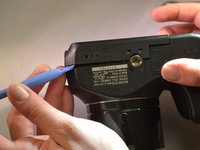
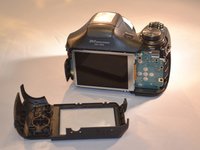
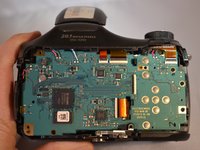
    • Remove the back panel (the LCD and motherboard are exposed).

  5. Sony Cyber-shot DSC-H200 LCD Screen Replacement: 5 단계, 이미지 1개 중 1개
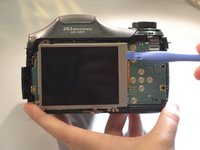
    • Using a screwdriver, remove the three 4mm screws that attach the LCD to the camera motherboard. (The LCD is contained in a holding plate, attached to the motherboard with a ribbon cable.)

  6. Sony Cyber-shot DSC-H200 LCD Screen Replacement: 6 단계, 이미지 1개 중 1개
    • Using a screwdriver, remove the single 4mm screw at the bottom of the holding plate.

  7. Sony Cyber-shot DSC-H200 LCD Screen Replacement: 7 단계, 이미지 2개 중 1개 Sony Cyber-shot DSC-H200 LCD Screen Replacement: 7 단계, 이미지 2개 중 2개
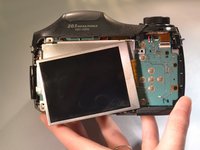
    • Lift the holding plate away from the motherboard and set aside.

  8. Sony Cyber-shot DSC-H200 LCD Screen Replacement: 8 단계, 이미지 1개 중 1개
    이 단계에 사용된 도구:
    Tweezers
    $4.99
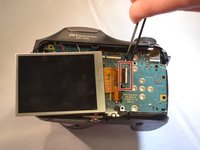
    • Using tweezers, open the LCD ribbon port by lifting the black hinge. (The LCD ribbon cable will detach.)

  9. Sony Cyber-shot DSC-H200 LCD Screen Replacement: 9 단계, 이미지 3개 중 1개 Sony Cyber-shot DSC-H200 LCD Screen Replacement: 9 단계, 이미지 3개 중 2개 Sony Cyber-shot DSC-H200 LCD Screen Replacement: 9 단계, 이미지 3개 중 3개
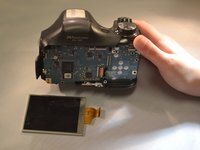
    • Using tweezers, remove the LCD with the ribbon cable and set aside.

결론

To reassemble your device, follow these instructions in reverse order.

작성자

6다른 기여자 명과 함께

Elizabeth Morrison

회원 가입일: 04/08/15

287 평판

안내서 2개를 작성함

1가이드 댓글

Where can you purchase a new replacement monitor?

Butch Sullivan - 답글

댓글 쓰기

조회 통계:

지난 24시간: 0

지난 7일: 4

지난 30일: 19

전체 시간: 2,920