주요 콘텐츠로 건너뛰기

Sony Cyber-shot DSC-HX1 Battery Replacement

  1. Sony Cyber-shot DSC-HX1 Battery Replacement, Battery: 1 단계, 이미지 1개 중 1개
    • Make sure the surface you place the screen on is clean of debris and dust. Otherwise you risk scratching your screen.

    • Place the camera with the bottom facing you and the lens facing up.

  2. Sony Cyber-shot DSC-HX1 Battery Replacement: 2 단계, 이미지 1개 중 1개
    • Push down and away from the camera to the left on the indicated indentation in the battery cover. The compartment should slide open as shown.

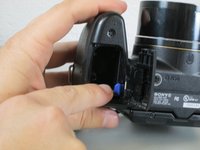
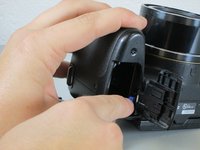
  3. Sony Cyber-shot DSC-HX1 Battery Replacement: 3 단계, 이미지 2개 중 1개 Sony Cyber-shot DSC-HX1 Battery Replacement: 3 단계, 이미지 2개 중 2개
    • Push the blue tab towards the camera body to the right, while simultaneously pulling out the battery.

    • The battery is not shown here. However, normally the battery would be in the displayed compartment.

결론

To reassemble your device, insert the new battery in the compartment, making sure that your battery has the correct orientation, then follow these instructions in reverse order.

작성자

3다른 기여자 명과 함께

Brianna Greenlaw

회원 가입일: 04/06/15

1,289 평판

안내서 5개를 작성함

Cal Poly, Team 17-3, Forte Spring 2015 Cal Poly, Team 17-3, Forte Spring 2015 회원

CPSU-FORTE-S15S17G3

4 회원들

안내서 10개를 작성함

0가이드 댓글

댓글 쓰기

조회 통계:

지난 24시간: 0

지난 7일: 3

지난 30일: 25

전체 시간: 1,564