주요 콘텐츠로 건너뛰기

Sony Cyber-shot DSC-HX90V Lens Replacement

필요한 것

  1. Sony Cyber-shot DSC-HX90V Lens Replacement, Button board: 1 단계, 이미지 2개 중 1개 Sony Cyber-shot DSC-HX90V Lens Replacement, Button board: 1 단계, 이미지 2개 중 2개
    • Place the device so bottom of the camera is facing up .

    • Remove the five marked screws with a Phillips #000 screwdriver.

    • Insert the spudger where arrow marks to gently remove the lower panel.

  2. Sony Cyber-shot DSC-HX90V Lens Replacement: 2 단계, 이미지 1개 중 1개
    • Remove the marked screw on the side of the camera with a Phillips #000 screwdriver.

  3. Sony Cyber-shot DSC-HX90V Lens Replacement: 3 단계, 이미지 1개 중 1개
    • Remove the marked screw with a Phillips #000 screwdriver.

  4. Sony Cyber-shot DSC-HX90V Lens Replacement: 4 단계, 이미지 1개 중 1개
    • Orient the device so the lens is facing down.

    • Remove the two black M1.4 X 3.5 Phillips head screws using Phillips #000 screwdriver.

  5. Sony Cyber-shot DSC-HX90V Lens Replacement: 5 단계, 이미지 1개 중 1개
    • Orient the device so the lens is facing down.

    • Remove the black M1.4 X 3.5 Phillips head screw.

  6. Sony Cyber-shot DSC-HX90V Lens Replacement, Side cover: 6 단계, 이미지 1개 중 1개
    • Use the plastic opening tool with a prying motion to remove the side cover of the camera.

    • The cover should come off easily but you might hear light snapping or popping.

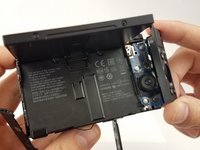
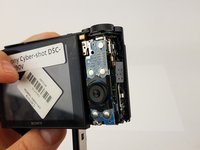
  7. Sony Cyber-shot DSC-HX90V Lens Replacement, LCD: 7 단계, 이미지 2개 중 1개 Sony Cyber-shot DSC-HX90V Lens Replacement, LCD: 7 단계, 이미지 2개 중 2개
    • Remove the small screw under the multi/USB cover.

    • Use the plastic opening tool to remove the button board.

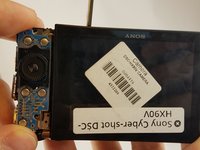
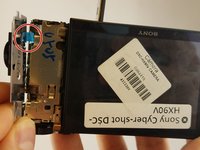
  8. Sony Cyber-shot DSC-HX90V Lens Replacement: 8 단계, 이미지 2개 중 1개 Sony Cyber-shot DSC-HX90V Lens Replacement: 8 단계, 이미지 2개 중 2개
    • Disconnect the control board data cable with care. Permanent damage may occur to the control board if tools are used to disconnect the data cable. Use your fingers only.

    • Disconnect the control board data cable by wiggling carefully with your fingertips. Set the control board to the side once it is disconnected.

  9. Sony Cyber-shot DSC-HX90V Lens Replacement: 9 단계, 이미지 1개 중 1개
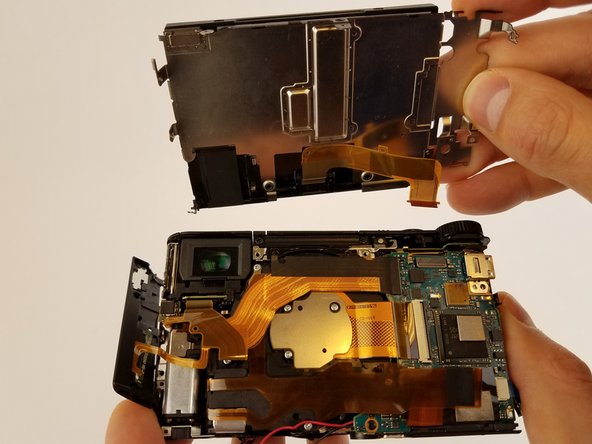
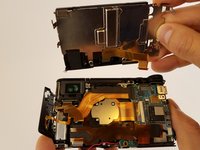
    • LCD screen is very fragile. Handle with care. Do not use tools to remove the screen.

    • Lift the metal plate and LCD screen simultaneously until it is perpendicular to the camera.

  10. Sony Cyber-shot DSC-HX90V Lens Replacement, Motherboard: 10 단계, 이미지 2개 중 1개 Sony Cyber-shot DSC-HX90V Lens Replacement, Motherboard: 10 단계, 이미지 2개 중 2개
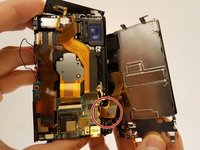
    • LCD screen is very fragile. Handle with care. Do not use tools to remove the screen.

    • Remove the ribbon cable connecting LCD display to camera sensor and battery housing.

  11. Sony Cyber-shot DSC-HX90V Lens Replacement: 11 단계, 이미지 1개 중 1개
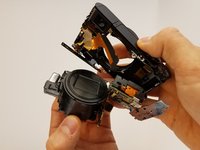
    • Make sure all ribbon cables are unplugged and remove the motherboard.

    • Ribbon wires can be easily damaged.

  12. Sony Cyber-shot DSC-HX90V Lens Replacement, Lens: 12 단계, 이미지 3개 중 1개 Sony Cyber-shot DSC-HX90V Lens Replacement, Lens: 12 단계, 이미지 3개 중 2개 Sony Cyber-shot DSC-HX90V Lens Replacement, Lens: 12 단계, 이미지 3개 중 3개
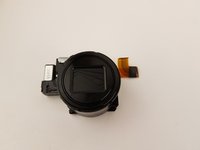
    • Press on the lens with your finger.

    • Gently pull the lens container out of the camera.

    • Make sure all ribbon wires are unplugged.

결론

To reassemble your device, follow these instructions in reverse order.

다른 8명이 해당 안내서를 완성하였습니다.

작성자

5다른 기여자 명과 함께

Marin Rusinov

회원 가입일: 02/02/17

853 평판

안내서 5개를 작성함

5가이드 댓글

Aside from a few missed screws, very nicely done. And I suspect that if one didn’t realize the need to remove those screws, sh/e probably shouldn’t be attempting the job in the first place. :) (I noted the comments after completing lens removal.)

Leon - 답글

Can you comment where/specifically the missing screws that were not listed can be found? Any other guides out there that are more comprehensive?

Eric C -

Under multi cover

Dufour - 답글

First at step 7

Dufour -

At step 8 remove two 2mm screws both lower sides of LCD

Dufour - 답글

댓글 쓰기

조회 통계:

지난 24시간: 5

지난 7일: 26

지난 30일: 111

전체 시간: 13,768