주요 콘텐츠로 건너뛰기

Sony Cyber-shot DSC-W570 LCD Screen Replacement

필요한 것

  1. Sony Cyber-shot DSC-W570 LCD Screen  Replacement, Case Cover: 1 단계, 이미지 1개 중 1개
    • Begin by facing the camera bottom side up to reveal the two 2.93 mm long screws

    • Remove these two screws using a Philips #00 screwdriver

    • Make sure the battery compartment door is in lock position.

  2. Sony Cyber-shot DSC-W570 LCD Screen  Replacement: 2 단계, 이미지 1개 중 1개
    • Turn the camera sideways on its left side making sure the two 2.93 mm long screws are facing upwards

    • Remove the two 2.93 mm long screws using a Phillips #00 screwdriver

    • Keep all screws on stable surface to not loose them

  3. Sony Cyber-shot DSC-W570 LCD Screen  Replacement: 3 단계, 이미지 1개 중 1개
    • Turn the camera on its right side making sure it is facing upwards

    • Remove the last two 2.93 mm long screws using a Phillips #00 screwdriver

  4. Sony Cyber-shot DSC-W570 LCD Screen  Replacement: 4 단계, 이미지 2개 중 1개 Sony Cyber-shot DSC-W570 LCD Screen  Replacement: 4 단계, 이미지 2개 중 2개
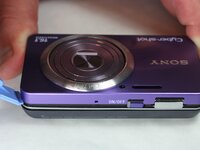
    • Face the device with the camera lens facing upwards

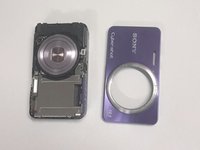
    • Now that all the screws are unscrewed, the plastic opening tool will be used to remove the front cover.

    • Gently pry off each corner of the cover to remove it

    • Once all corners are pried off, gently lift off the cover and place it on the side

  5. Sony Cyber-shot DSC-W570 LCD Screen  Replacement: 5 단계, 이미지 2개 중 1개 Sony Cyber-shot DSC-W570 LCD Screen  Replacement: 5 단계, 이미지 2개 중 2개
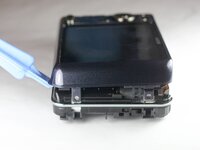
    • Flip the device, making sure the screen is facing upwards

    • The back case should now be visible and ready to remove

    • Use the plastic opening tool to gently pry all along the corners and sides of the camera.

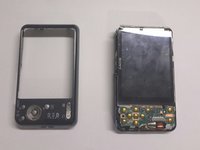
    • Gently lift off the entire back cover and place it on the side

  6. Sony Cyber-shot DSC-W570 LCD Screen  Replacement, LCD Screen: 6 단계, 이미지 1개 중 1개
    • Taking off the previous cover will reveal the two cables connecting the LCD screen to the motherboard below the screen.

  7. Sony Cyber-shot DSC-W570 LCD Screen  Replacement: 7 단계, 이미지 1개 중 1개
    • Remove the LCD screen from the side opposite the battery terminals.

    • Watch carefully for the two cords mentioned in the previous step. These will still be connected.

    • The side will flip up as shown in the next step.

  8. Sony Cyber-shot DSC-W570 LCD Screen  Replacement: 8 단계, 이미지 1개 중 1개
    • Pull these two cords straight back to disconnect them from the respective housings.

    • Caution: The housing does not need to be moved or adjusted in any way. DO NOT pull the cords at an angle, it can destroy the cords and the housing. Pull Straight Back!

  9. Sony Cyber-shot DSC-W570 LCD Screen  Replacement: 9 단계, 이미지 1개 중 1개
    • This is what the camera should look like after 2 cords and the screen have been removed.

    • The lens cord is being held to the side for a clearer view.

결론

To reassemble your device, follow these instructions in reverse order.

다른 한 분이 해당 안내서를 완성하였습니다.

작성자

5다른 기여자 명과 함께

Thomas Plummer

회원 가입일: 01/21/15

164 평판

안내서 1개를 작성함

USF Tampa, Team 9-1, Brown Winter 2015 USF Tampa, Team 9-1, Brown Winter 2015 회원

USFT-BROWN-W15S9G1

5 회원들

안내서 10개를 작성함

2가이드 댓글

And the screen replacement how??

Pau Roqué Robert - 답글

댓글 쓰기

조회 통계:

지난 24시간: 1

지난 7일: 10

지난 30일: 37

전체 시간: 1,630