주요 콘텐츠로 건너뛰기

Sony Cyber-shot DSC-WX100 LCD Screen Replacement

필요한 것

  1. Sony Cyber-shot DSC-WX100 LCD Screen Replacement, Battery: 1 단계, 이미지 1개 중 1개
    • Open the flap indicated to allow access to the battery slot.

    • The gray switch indicated has to be moved to the right in order to release the flap.

  2. Sony Cyber-shot DSC-WX100 LCD Screen Replacement: 2 단계, 이미지 1개 중 1개
    • If the old battery is still in the slot, then make sure the camera is turned off prior to removal.

    • If there is a battery currently in the slot, remove by first pulling downwards on the blue component. This will allow you to remove the battery from the slot.

  3. Sony Cyber-shot DSC-WX100 LCD Screen Replacement, Outer Casing: 3 단계, 이미지 3개 중 1개 Sony Cyber-shot DSC-WX100 LCD Screen Replacement, Outer Casing: 3 단계, 이미지 3개 중 2개 Sony Cyber-shot DSC-WX100 LCD Screen Replacement, Outer Casing: 3 단계, 이미지 3개 중 3개
    • Remove all of the 1mm screws using a Philips #000 Screwdriver.

    • Remover the rest of the screws (2mm) from the camera covers using a Phillips #000 Screwdriver.

  4. Sony Cyber-shot DSC-WX100 LCD Screen Replacement: 4 단계, 이미지 2개 중 1개 Sony Cyber-shot DSC-WX100 LCD Screen Replacement: 4 단계, 이미지 2개 중 2개
    • Use the plastic opening tool to gently remove the front and back plates of the camera.

  5. Sony Cyber-shot DSC-WX100 LCD Screen Replacement: 5 단계, 이미지 2개 중 1개 Sony Cyber-shot DSC-WX100 LCD Screen Replacement: 5 단계, 이미지 2개 중 2개
    • Use a plastic opening tool to gently release the two indicated tabs.

    • Pull up on the lower end of the plate. Lift it so the plate is high enough so that the marked bump is not holding it in place.

    • Pull away from the camera at the end of the metal plate with the blue circuits to then remove the plate from the rest of the camera.

    • For help please watch the video.

  6. Sony Cyber-shot DSC-WX100 LCD Screen Replacement: 7 단계, 이미지 3개 중 1개 Sony Cyber-shot DSC-WX100 LCD Screen Replacement: 7 단계, 이미지 3개 중 2개 Sony Cyber-shot DSC-WX100 LCD Screen Replacement: 7 단계, 이미지 3개 중 3개
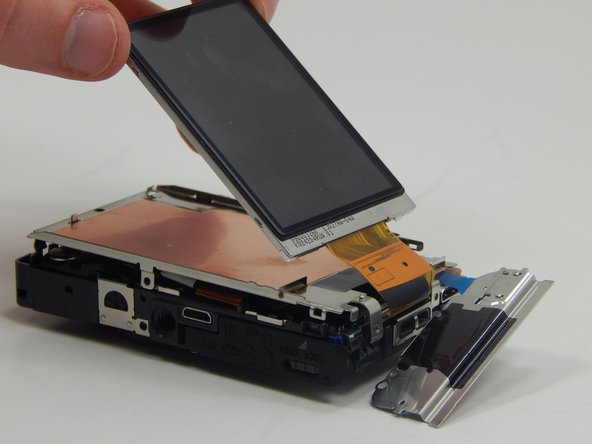
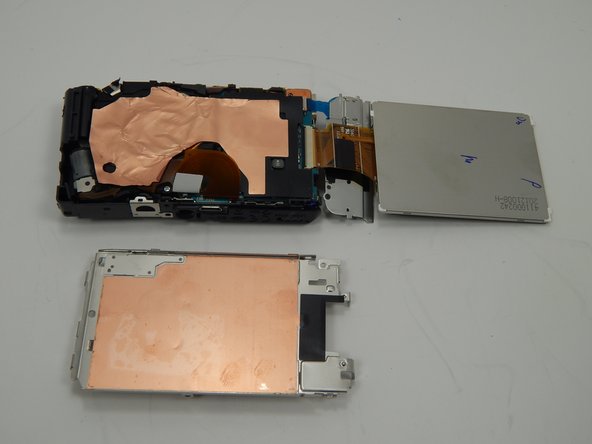
    • Remove this screw (1mm) with a Phillips #000 Screwdriver.

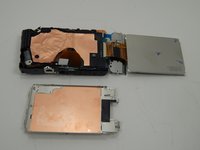
    • Gently lift the LCD from the metal plate.

    • Remove the metal plate that was underneath the LCD screen from the camera.

  7. Sony Cyber-shot DSC-WX100 LCD Screen Replacement: 8 단계, 이미지 3개 중 1개 Sony Cyber-shot DSC-WX100 LCD Screen Replacement: 8 단계, 이미지 3개 중 2개 Sony Cyber-shot DSC-WX100 LCD Screen Replacement: 8 단계, 이미지 3개 중 3개
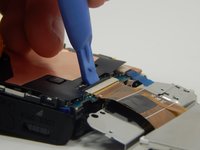
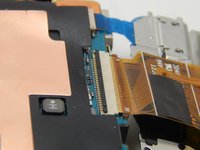
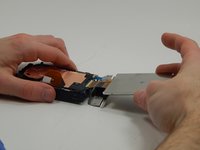
    • Use the plastic opening tool to pry the black bar upwards.

    • Pull the LCD screen from out of the slot.

결론

To reassemble your device, follow these instructions in reverse order.

다른 한 분이 해당 안내서를 완성하였습니다.

작성자

2다른 기여자 명과 함께

Peter Prins

회원 가입일: 03/19/15

262 평판

안내서 2개를 작성함

Michigan Tech, Team 1-9, Lauer Spring 2015 Michigan Tech, Team 1-9, Lauer Spring 2015 회원

MTU-LAUER-S15S1G9

2 회원들

안내서 6개를 작성함

1가이드 댓글

be careful with capacitor !!! i touched it 5-10 minutes after battery was removed and felt electricity in my chest, ears… be careful :D

k.bilius - 답글

댓글 쓰기

조회 통계:

지난 24시간: 0

지난 7일: 2

지난 30일: 14

전체 시간: 1,630