주요 콘텐츠로 건너뛰기

Sony Ericsson s710a LCD Screen Replacement

필요한 것

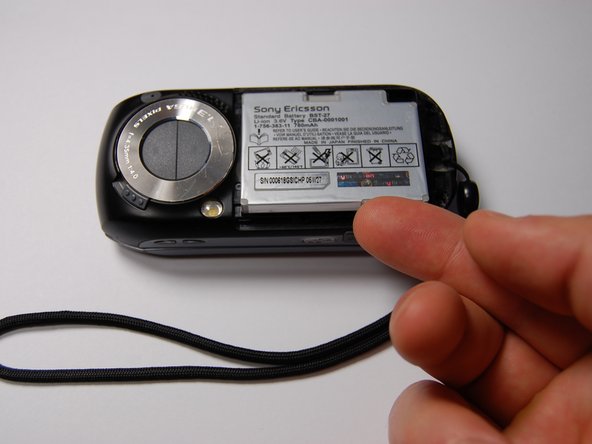
  1. Sony Ericsson s710a LCD Screen Replacement, Battery: 1 단계, 이미지 1개 중 1개
    • Remove the back cover by sliding it off.

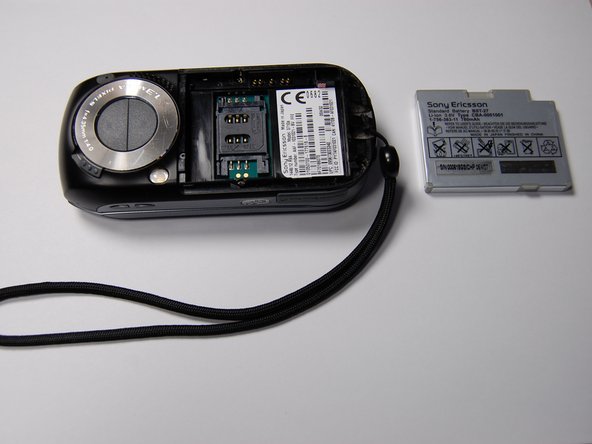
  2. Sony Ericsson s710a LCD Screen Replacement: 2 단계, 이미지 1개 중 1개
    • Pull the battery out using your finger.

  3. Sony Ericsson s710a LCD Screen Replacement: 3 단계, 이미지 1개 중 1개
    • The battery can now be replaced.

    • The battery is a 780 mAh rechargeable Lithium Ion battery.

  4. Sony Ericsson s710a LCD Screen Replacement, LCD Screen: 4 단계, 이미지 1개 중 1개
    • Remove the four 6 mm screws from beneath the battery using a Phillips #00 screwdriver.

  5. Sony Ericsson s710a LCD Screen Replacement: 5 단계, 이미지 1개 중 1개
    • Remove the microphone cover using the iFixit opening tool.

  6. Sony Ericsson s710a LCD Screen Replacement: 6 단계, 이미지 1개 중 1개
    • Remove the two 6 mm screws from the front of the phone beneath the microphone cover using a Phillips #00 screwdriver.

  7. Sony Ericsson s710a LCD Screen Replacement: 7 단계, 이미지 1개 중 1개
    • Remove the black plastic piece on the side.

    • This will allow for easier access while prying the motherboard.

  8. Sony Ericsson s710a LCD Screen Replacement: 8 단계, 이미지 1개 중 1개
    • Use the iFixit opening tool to loosen the motherboard from the phone.

  9. Sony Ericsson s710a LCD Screen Replacement: 9 단계, 이미지 1개 중 1개
    • Lift the motherboard out with your fingers.

    • Pull slowly. This will require some force.

  10. Sony Ericsson s710a LCD Screen Replacement: 10 단계, 이미지 1개 중 1개
    • Remove the two cable connectors using the iFixit opening tool.

    • Mark the orientation and port of each cable before detaching them. The connectors are symmetrical, so this is essential for reassembly.

  11. Sony Ericsson s710a LCD Screen Replacement: 11 단계, 이미지 1개 중 1개
    • On the rotational assembly remove the following screws:

    • Four 3 mm screws

    • Two 2.3 mm screws

    • Lift the rotational assembly off of the phone to allow access to the other half of the device.

  12. Sony Ericsson s710a LCD Screen Replacement: 12 단계, 이미지 1개 중 1개
    • Detach the cable connectors on the other end of the cables using a plastic opening tool.

    • Record the orientation and location of each connector for reassembly.

  13. Sony Ericsson s710a LCD Screen Replacement: 13 단계, 이미지 1개 중 1개
    • Remove the plastic cover on the back of the phone using an iFixit opening tool.

    • Remove the four 6 mm screws using a Phillips #00 screwdriver.

  14. Sony Ericsson s710a LCD Screen Replacement: 14 단계, 이미지 1개 중 1개
    • Pry the screen assembly from the main case using the iFixit opening tool.

  15. Sony Ericsson s710a LCD Screen Replacement: 15 단계, 이미지 1개 중 1개
    • With the face plate and LCD screen exposed, replace the existing LCD screen with a new LCD screen.

    • Be sure to test and make sure the detachable connections are arranged correctly.

결론

To reassemble your device, follow these instructions in reverse order.

작성자

9다른 기여자 명과 함께

Jamel Lugg

회원 가입일: 10/29/11

1 평판

안내서 1개를 작성함

0가이드 댓글

댓글 쓰기

조회 통계:

지난 24시간: 0

지난 7일: 2

지난 30일: 8

전체 시간: 1,593