주요 콘텐츠로 건너뛰기

Sony Xperia Z3 Compact Battery Replacement

필요한 것

  1. Sony Xperia Z3 Compact Battery Replacement, Sony Xperia Z3 Compact Battery Replacement: 1 단계, 이미지 3개 중 1개 Sony Xperia Z3 Compact Battery Replacement, Sony Xperia Z3 Compact Battery Replacement: 1 단계, 이미지 3개 중 2개 Sony Xperia Z3 Compact Battery Replacement, Sony Xperia Z3 Compact Battery Replacement: 1 단계, 이미지 3개 중 3개
    • Heat the back cover of your Xperia Z3 Compact with an iOpener to loosen the adhesive underneath.

    • Lift up the back cover with a suction handle and put an opening pick in the gap.

    • Move the pick carefully around the edges to loosen the adhesive on every side of the phone.

    • Now you can pull up the back cover with the suction handle.

  2. Sony Xperia Z3 Compact Battery Replacement: 2 단계, 이미지 2개 중 1개 Sony Xperia Z3 Compact Battery Replacement: 2 단계, 이미지 2개 중 2개
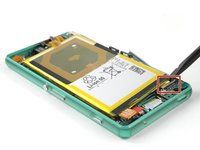
    • Use a tweezer to remove the model label which is hooked in the right side of the frame.

    • Undo the flex cable of the NFC antenna with a tweezer.

  3. Sony Xperia Z3 Compact Battery Replacement: 3 단계, 이미지 2개 중 1개 Sony Xperia Z3 Compact Battery Replacement: 3 단계, 이미지 2개 중 2개
    • Unscrew the following screws which hold down the mid frame of the Sony Xperia Z3 Compact.

    • Two 2.7 mm Phillips #000

    • Three 2.5 mm Phillips #000

    • Use a Spudger to lift up the mid frame on each side.

    • Be careful and patient, the plastic mid frame is fragile and might break if bent too hard.

  4. Sony Xperia Z3 Compact Battery Replacement: 4 단계, 이미지 3개 중 1개 Sony Xperia Z3 Compact Battery Replacement: 4 단계, 이미지 3개 중 2개 Sony Xperia Z3 Compact Battery Replacement: 4 단계, 이미지 3개 중 3개
    • Declamp the metal bracket which holds down the flex connector of the rear camera.

    • Unplug the flex connector of the rear camera and lift it out of its recess.

  5. Sony Xperia Z3 Compact Battery Replacement: 5 단계, 이미지 2개 중 1개 Sony Xperia Z3 Compact Battery Replacement: 5 단계, 이미지 2개 중 2개
    • Use a Spudger to unplug the headphone jack and sensor cable connector.

    • Unscrew the single 2.5 mm Phillips #000 screw on the upper left side of the motherboard.

  6. Sony Xperia Z3 Compact Battery Replacement: 6 단계, 이미지 3개 중 1개 Sony Xperia Z3 Compact Battery Replacement: 6 단계, 이미지 3개 중 2개 Sony Xperia Z3 Compact Battery Replacement: 6 단계, 이미지 3개 중 3개
    • Unplug the battery and display flex connectors.

    • Open the compartments for the SIM card and the micro SD card and remove them.

  7. Sony Xperia Z3 Compact Battery Replacement: 7 단계, 이미지 3개 중 1개 Sony Xperia Z3 Compact Battery Replacement: 7 단계, 이미지 3개 중 2개 Sony Xperia Z3 Compact Battery Replacement: 7 단계, 이미지 3개 중 3개
    • Use a Spudger to slightly lift up the motherboard.

    • Be careful! You need to thread the display flex cable through a gap in the motherboard while lifting it up. It is also connected to the vibration motor, which still sticks to the phone.

    • Take especially care of the two black connectors on the side of the battery. They break off easily during the removal of the motherboard.

    • Use a tweezer to take out the vibration motor and then remove the motherboard completely.

  8. Sony Xperia Z3 Compact Battery Replacement: 8 단계, 이미지 3개 중 1개 Sony Xperia Z3 Compact Battery Replacement: 8 단계, 이미지 3개 중 2개 Sony Xperia Z3 Compact Battery Replacement: 8 단계, 이미지 3개 중 3개
    이 단계에 사용된 도구:
    Plastic Cards
    $2.99
    • Gently pull out both of the black straps with the adhesive tabs underneath the battery.

    • Never pull out the straps upwards but always sideways. It can easily happen that you rupture the adhesive tabs. In this case use a plastic card to pry off the battery carefully,Use a little bit of heat if necessary!

    • Now you can remove the battery from the motherboard easily.

  9. Sony Xperia Z3 Compact Battery Replacement: 9 단계, 이미지 3개 중 1개 Sony Xperia Z3 Compact Battery Replacement: 9 단계, 이미지 3개 중 2개 Sony Xperia Z3 Compact Battery Replacement: 9 단계, 이미지 3개 중 3개
    • Warm up the NFC antenna a little bit to loosen the adhesive underneath.

    • Carefully peel it off the battery. If the adhesive starts to crumble use a plastic card to loosen the adhesive.

결론

To reassemble your device, follow these instructions in reverse order.

다른 24명이 해당 안내서를 완성하였습니다.

작성자

5다른 기여자 명과 함께

Tobias Isakeit

회원 가입일: 03/31/14

129,223 평판

안내서 189개를 작성함

Tobias Isakeit - Repairability Engineer Tobias Isakeit - Repairability Engineer 회원

Business

1 회원

안내서 1,145개를 작성함

10가이드 댓글

Thank you Tobias !

My Z3 compact starts now his second life :)

Guy Hard - 답글

Thank you for repairing your phone and giving it a second chance.

:)

Tobias Isakeit -

Where do I need the Back Cover Adhesive Strips for?

Visser - 답글

The guide doesn’t mention that one needs new adhesive for the battery (the one I bought isn’t sold with it). It would therefore be wise to mention what kind of adhesive (two-sided, what thckness, etc.)

axel - 답글

Double sided tape is enough to keep it in place, as the back cover and midframe holds everything down for extra reinforcement. Sony sure makes their smartphones !&&* to repair, but that’s another rant.

William Nephew -

댓글 쓰기

조회 통계:

지난 24시간: 6

지난 7일: 48

지난 30일: 178

전체 시간: 43,224