소개
Replace the aging built-in keyboard.
필요한 것
-
-
Flip the computer over.
-
Remove the two 24.1mm Phillips screws near the front of the case.
-
Remove the five 33.0 mm Phillips screws towards the back of the case.
 FixBot에 문의하기
-
-
-
-
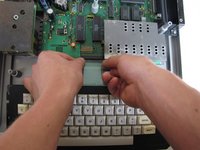
Near the motherboard, gently pull the keyboard ribbon cable until it becomes free.
-
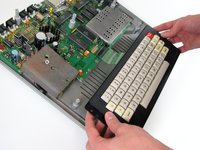
Lift the keyboard out of the case.
-


To reassemble your device, follow these instructions in reverse order.
다른 3명이 해당 안내서를 완성하였습니다.

팀

Cal Poly, Team 11-24, Maness Winter 2011 Cal Poly, Team 11-24, Maness Winter 2011 회원
CPSU-MANESS-W11S11G24
4 회원들
안내서 10개를 작성함
1가이드 댓글
This only applies for Color Computers issued after the CoCo 1 F Board (as shown) RS catalog 26-3004 and subsequent models (CoCo 2 & 3). Early editions of the CoCo 1 had not a mylar ribbon cable like this but a heavier ribbon composed of actual wires, the connector they went into was also built for this type of ribbon. The keyboards on each category of connecting ribbon are sadly not interchangeable.
