주요 콘텐츠로 건너뛰기

Toshiba CB35-C3300 Chromebook 2 Back Cover Replacement

필요한 것

  1. Toshiba CB35-C3300 Chromebook 2 Back Cover Replacement, Back Cover: 1 단계, 이미지 2개 중 1개 Toshiba CB35-C3300 Chromebook 2 Back Cover Replacement, Back Cover: 1 단계, 이미지 2개 중 2개
    • Remove the 2 rubber foot pads from the bottom (opposite the hinge) with the small Plastic Opening tool.

  2. Toshiba CB35-C3300 Chromebook 2 Back Cover Replacement: 2 단계, 이미지 2개 중 1개 Toshiba CB35-C3300 Chromebook 2 Back Cover Replacement: 2 단계, 이미지 2개 중 2개
    • Remove the 10 7.1 mm screws using Phillips #1 screwdriver.

  3. Toshiba CB35-C3300 Chromebook 2 Back Cover Replacement: 3 단계, 이미지 1개 중 1개
    • Loosen the back cover by using a plastic opening tool all the way around the device.

    • There are areas all along the sides of the device that help aid in this.

    • Be careful when prying, and go slow. The silver plastic frame around the dull gray plastic bottom is fragile and easily dented from prying pressure.

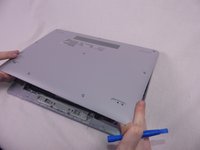
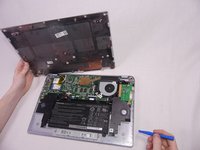
  4. Toshiba CB35-C3300 Chromebook 2 Back Cover Replacement: 4 단계, 이미지 2개 중 1개 Toshiba CB35-C3300 Chromebook 2 Back Cover Replacement: 4 단계, 이미지 2개 중 2개
    • Remove the back cover by gently lifting up on one side of the device.

    • The easiest side to lift up on is the one with the removed rubber foot pads.

결론

To reassemble your device, follow these instructions in reverse order.

다른 한 분이 해당 안내서를 완성하였습니다.

작성자

4다른 기여자 명과 함께

Jillian Thomas

회원 가입일: 10/14/17

209 평판

안내서 4개를 작성함

USF Tampa, Team S1-G121, Cagle Fall 2017 USF Tampa, Team S1-G121, Cagle Fall 2017 회원

USFT-CAGLE-F17S1G121

3 회원들

안내서 14개를 작성함

0가이드 댓글

댓글 쓰기

조회 통계:

지난 24시간: 0

지난 7일: 1

지난 30일: 9

전체 시간: 509