주요 콘텐츠로 건너뛰기

Toshiba NB305 RAM Replacement

필요한 것

  1. Toshiba NB305 RAM  Replacement, Battery: 1 단계, 이미지 1개 중 1개
    • Place the laptop upside down with the battery facing you.

  2. Toshiba NB305 RAM  Replacement: 2 단계, 이미지 1개 중 1개
    • Use your right hand to move latch 1 to the right to unlock the battery.

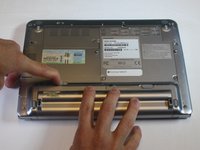
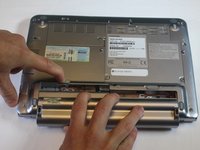
  3. Toshiba NB305 RAM  Replacement: 3 단계, 이미지 2개 중 1개 Toshiba NB305 RAM  Replacement: 3 단계, 이미지 2개 중 2개
    • Use your left hand to hold latch 2 to the left.

    • Simultaneously take the battery out with your right hand.

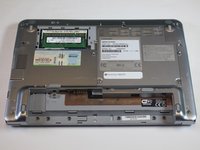
  4. Toshiba NB305 RAM  Replacement, RAM: 4 단계, 이미지 1개 중 1개
    • The RAM is located underneath the top left panel on the back of the laptop.

    • Remove the captive Phillips-0 screw with a screwdriver.

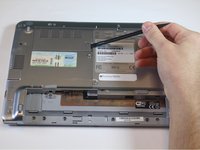
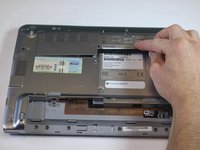
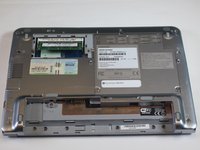
  5. Toshiba NB305 RAM  Replacement: 5 단계, 이미지 2개 중 1개 Toshiba NB305 RAM  Replacement: 5 단계, 이미지 2개 중 2개
    • Using a spudger pry up on the open slit next to the screw.

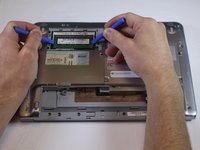
  6. Toshiba NB305 RAM  Replacement: 6 단계, 이미지 2개 중 1개 Toshiba NB305 RAM  Replacement: 6 단계, 이미지 2개 중 2개
    • The RAM is held in place with two clips, one on each side.

    • Using two plastic opening tools (or your fingers) pull two tabs holding RAM outwards.

    • The RAM card will pop up when it is released.

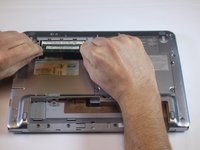
  7. Toshiba NB305 RAM  Replacement: 7 단계, 이미지 2개 중 1개 Toshiba NB305 RAM  Replacement: 7 단계, 이미지 2개 중 2개
    • Pull the RAM straight out of the slot.

결론

To reassemble your device, follow these instructions in reverse order.

작성자

2다른 기여자 명과 함께

Nuri Chung

회원 가입일: 10/25/16

377 평판

안내서 3개를 작성함

USF Tampa, Team 5-5, Lacy Fall 2016 USF Tampa, Team 5-5, Lacy Fall 2016 회원

USFT-LACY-F16S5G5

3 회원들

안내서 15개를 작성함

0가이드 댓글

댓글 쓰기

조회 통계:

지난 24시간: 0

지난 7일: 5

지난 30일: 18

전체 시간: 867