주요 콘텐츠로 건너뛰기

Toshiba Satellite C55-B5200 Optical Disk Drive Replacement

필요한 것

  1. Toshiba Satellite C55-B5200 Optical Disk Drive Replacement, Battery: 1 단계, 이미지 1개 중 1개
    • Turn the laptop off and remove all sources of power.

    • Flip the laptop over so that way the bottom is facing towards you.

    • Remove the two 6.6mm Phillips #0 screws from the battery.

  2. Toshiba Satellite C55-B5200 Optical Disk Drive Replacement: 2 단계, 이미지 1개 중 1개
    • Pull the battery out of the laptop.

  3. Toshiba Satellite C55-B5200 Optical Disk Drive Replacement, Optical Disk Drive: 3 단계, 이미지 1개 중 1개
    • Make sure device is turned off and unplugged

    • Failure to do so could result in electric shock

    • Use J0 Philips Head Screwdrivers to remove 13, 6.6 mm screws on back of device

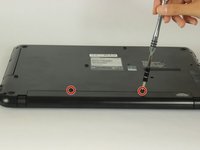
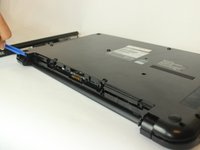
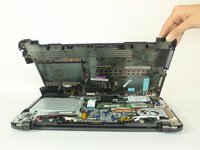
  4. Toshiba Satellite C55-B5200 Optical Disk Drive Replacement: 4 단계, 이미지 3개 중 1개 Toshiba Satellite C55-B5200 Optical Disk Drive Replacement: 4 단계, 이미지 3개 중 2개 Toshiba Satellite C55-B5200 Optical Disk Drive Replacement: 4 단계, 이미지 3개 중 3개
    • Remove the remaining two, 6.6 mm screws to remove the battery

    • Use a plastic opening tool to lift and open the back

  5. Toshiba Satellite C55-B5200 Optical Disk Drive Replacement: 5 단계, 이미지 1개 중 1개
    • Lift and pull out disk drive

결론

To reassemble your device, follow these instructions in reverse order.

다른 2명이 해당 안내서를 완성하였습니다.

작성자

3다른 기여자 명과 함께

Pablo Andrade

회원 가입일: 02/14/18

1,126 평판

안내서 7개를 작성함

USF Tampa, Team S3-G1, Nance Spring 2018 USF Tampa, Team S3-G1, Nance Spring 2018 회원

USFT-NANCE-S18S3G1

4 회원들

안내서 22개를 작성함

0가이드 댓글

댓글 쓰기

조회 통계:

지난 24시간: 0

지난 7일: 2

지난 30일: 10

전체 시간: 889