주요 콘텐츠로 건너뛰기

Toshiba Satellite C55-C5240 Back cover Replacement

단지 전제 조건
이 가이드는 전제 조건 전용 가이드입니다! 이 가이드는 다른 절차의 일부이며 단독으로 사용할 수 없습니다.

필요한 것

  1. Toshiba Satellite C55-C5240 Back cover Replacement, Battery: 1 단계, 이미지 3개 중 1개 Toshiba Satellite C55-C5240 Back cover Replacement, Battery: 1 단계, 이미지 3개 중 2개 Toshiba Satellite C55-C5240 Back cover Replacement, Battery: 1 단계, 이미지 3개 중 3개
    • Make sure you turn off the laptop before starting.

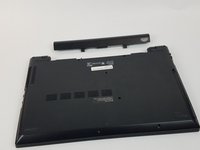
    • Remove the two 6.5mm PH1 Phillips screws securing the battery.

  2. Toshiba Satellite C55-C5240 Back cover Replacement: 2 단계, 이미지 3개 중 1개 Toshiba Satellite C55-C5240 Back cover Replacement: 2 단계, 이미지 3개 중 2개 Toshiba Satellite C55-C5240 Back cover Replacement: 2 단계, 이미지 3개 중 3개
    • Pull the battery out, keeping it flat and parallel to the laptop so that it slides out easily.

  3. Toshiba Satellite C55-C5240 Back cover Replacement, Back cover: 3 단계, 이미지 2개 중 1개 Toshiba Satellite C55-C5240 Back cover Replacement, Back cover: 3 단계, 이미지 2개 중 2개
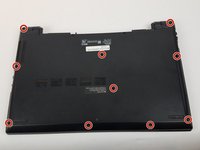
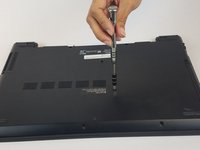
    • Unscrew the ten 6.5mm PH1 Phillips head screws that hold down the back cover.

  4. Toshiba Satellite C55-C5240 Back cover Replacement: 4 단계, 이미지 3개 중 1개 Toshiba Satellite C55-C5240 Back cover Replacement: 4 단계, 이미지 3개 중 2개 Toshiba Satellite C55-C5240 Back cover Replacement: 4 단계, 이미지 3개 중 3개
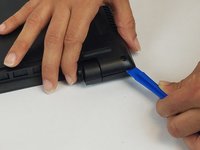
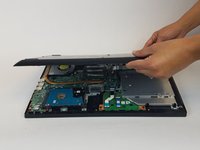
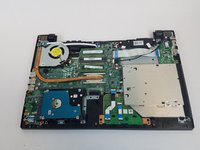
    • Using the plastic opening tools, open the back cover and remove it from the laptop.

    • It is recommended that you start from a corner and run the tool along the edge of the cover.

    • Be careful not to bend or crack the cover.

결론

To reassemble your device, follow these instructions in reverse order.

작성자

2다른 기여자 명과 함께

Abdel Feliciano Gonzalez

회원 가입일: 02/28/17

722 평판

안내서 4개를 작성함

USF Tampa, Team S1-G5, Nance Spring 2017 USF Tampa, Team S1-G5, Nance Spring 2017 회원

USFT-NANCE-S17S1G5

3 회원들

안내서 18개를 작성함

0가이드 댓글

댓글 쓰기

조회 통계:

지난 24시간: 0

지난 7일: 0

지난 30일: 2

전체 시간: 89