주요 콘텐츠로 건너뛰기

VTech InnoTab 2s Speaker Replacement

필요한 것

  1. VTech InnoTab 2s Speaker Replacement, Back Panel: 1 단계, 이미지 1개 중 1개
    • Turn your device to where the back panel is facing you.

  2. VTech InnoTab 2s Speaker Replacement: 2 단계, 이미지 2개 중 1개 VTech InnoTab 2s Speaker Replacement: 2 단계, 이미지 2개 중 2개
    • Lift the Leg all the way up and twist the bottom to remove.

    • Once the bottom part pops out the whole leg should just come off.

    • Remove any game cartridge from the device.

  3. VTech InnoTab 2s Speaker Replacement: 3 단계, 이미지 3개 중 1개 VTech InnoTab 2s Speaker Replacement: 3 단계, 이미지 3개 중 2개 VTech InnoTab 2s Speaker Replacement: 3 단계, 이미지 3개 중 3개
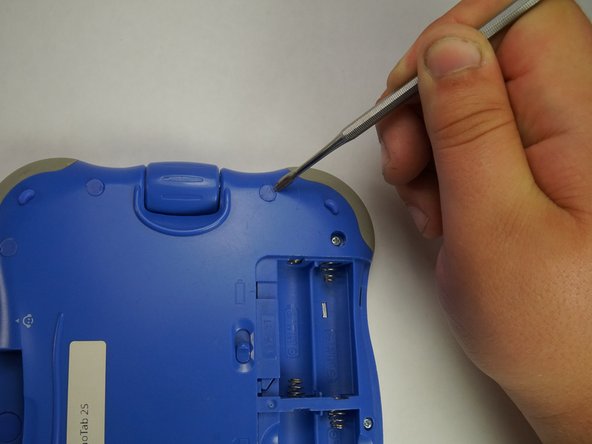
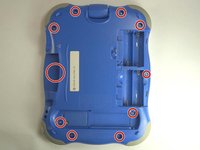
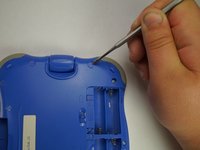
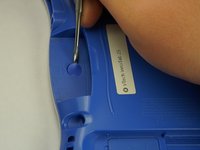
    • Remove all of the plastic tabs on the device. These are covering screws that will need to be removed.

    • These covers are made of hard plastic so they may be difficult to remove.

    • There is a special tab in the cartridge cover that is made of rubber, make sure to not break this tab.

  4. VTech InnoTab 2s Speaker Replacement: 4 단계, 이미지 2개 중 1개 VTech InnoTab 2s Speaker Replacement: 4 단계, 이미지 2개 중 2개
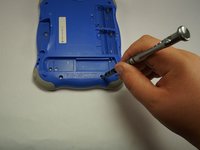
    • Remove all nine screws from the back of the device using a J0 bit.

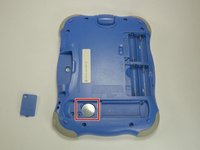
    • Remove the small battery.

  5. VTech InnoTab 2s Speaker Replacement: 5 단계, 이미지 2개 중 1개 VTech InnoTab 2s Speaker Replacement: 5 단계, 이미지 2개 중 2개
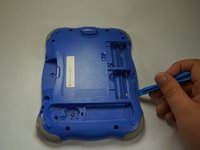
    • Using a plastic opening tool, detach the backplate from the front piece.

    • Do not use excessive force. Double check that you removed all the screws if the panel is not coming off easily.

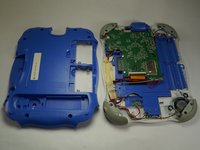
    • Once the backplate has been removed, you will have access to the circuit board.

  6. VTech InnoTab 2s Speaker Replacement, Motherboard: 6 단계, 이미지 1개 중 1개
    • First begin by removing the three cross-head screws using a J0 bit.

  7. VTech InnoTab 2s Speaker Replacement: 7 단계, 이미지 1개 중 1개
    • First remove the ribbon cables. There are two highlighted by the red squares

    • Do not apply too much pressure and make sure that the black plastic tabs are fully open before you pull the cable out.

  8. VTech InnoTab 2s Speaker Replacement: 8 단계, 이미지 1개 중 1개
    • Remove the camera from the assembly and put is a safe place so that it will not get damaged.

  9. VTech InnoTab 2s Speaker Replacement: 9 단계, 이미지 1개 중 1개
    • Remove the board from the main assembly.

    • Be careful not to pull too hard so that the cables aren't broken.

  10. VTech InnoTab 2s Speaker Replacement: 10 단계, 이미지 1개 중 1개
    • De-solder the points shown to fully remove the cables and free the board.

    • A soldering guide offered by IFIXIT can be found here Soldering Skills.

  11. VTech InnoTab 2s Speaker Replacement, Speaker: 11 단계, 이미지 1개 중 1개
    • Desolder these two points from the circuit board.

    • A soldering guide provided by iFixit can be found here: Soldering Skills.

  12. VTech InnoTab 2s Speaker Replacement: 12 단계, 이미지 1개 중 1개
    • Remove the two screws that are holding down the speaker.

  13. VTech InnoTab 2s Speaker Replacement: 13 단계, 이미지 1개 중 1개
    • Desolder the two wires that are connected to the speaker.

    • A soldering guide offered by IFIXIT can be found here: Soldering Skills.

결론

To reassemble your device, follow these instructions in reverse order.

작성자

2다른 기여자 명과 함께

Esthevan Romeiro

회원 가입일: 10/06/16

261 평판

안내서 4개를 작성함

USF Tampa, Team 5-1, Lacy Fall 2016 USF Tampa, Team 5-1, Lacy Fall 2016 회원

USFT-LACY-F16S5G1

4 회원들

안내서 12개를 작성함

1가이드 댓글

Thank you for this guide. I have a Vtech (ELC) toy flip phone, which has similar issue. I think your guide is incomplete, has only 13 steps and stops at desoldering the speaker. What speaker shall I get, does it matter, or just the size matters? Thank you!

Scream - 답글

댓글 쓰기

조회 통계:

지난 24시간: 1

지난 7일: 2

지난 30일: 13

전체 시간: 428