소개
One common issue that many people have had in regards to their VTech baby phone was song looping, which may be a result of low battery charge. If replacing the batteries does not solve your problem, this guide will still get you started on replacing all the other items inside the device. The first thing you will need to do before replacing any of the parts in your VTech baby phone, is remove the batteries. For many common issues, simply replacing the batteries will fix the problem. If you need to replace the battery of your VTech Touch and Swipe Baby Phone follow this guide.
필요한 것
-
-
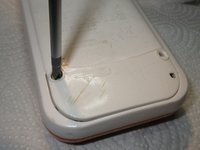
Using a Phillips #1 screwdriver, remove the 4.8mm screw on the battery cover by twisting the screwdriver counter-clockwise.
-
-


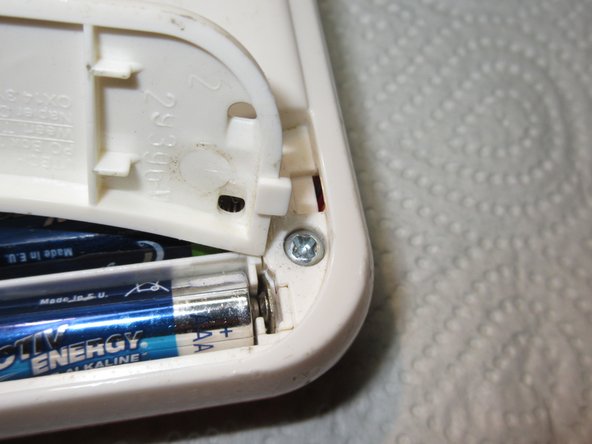
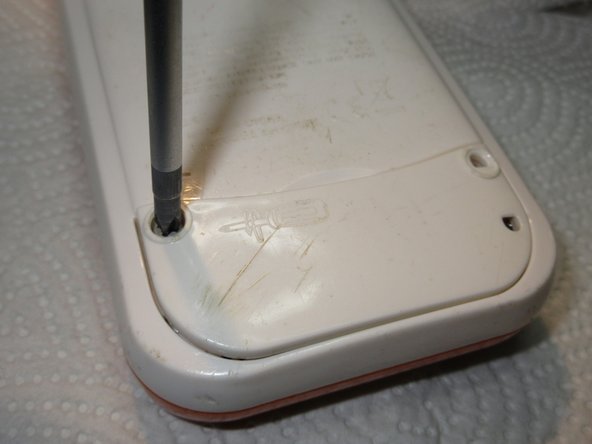
To reassemble your device, follow these instructions in reverse order.
다른 한 분이 해당 안내서를 완성하였습니다.



팀

USF Tampa, Team 2-4, Sullivan Fall 2015 USF Tampa, Team 2-4, Sullivan Fall 2015 회원
USFT-SULLIVAN-F15S2G4
3 회원들
안내서 12개를 작성함
2가이드 댓글
Seems this device is VERY sensitive to low batteries. An issue I assumed was the power switch (randomly turning off) was actually batteries. Also hilarious this has an iFixit page.
Chris Uthe - 답글
Thank you! Changing the batteries fixed the loop issue
