주요 콘텐츠로 건너뛰기

Vtech Kidizoom Smart Watch DX Master Switch Replacement

필요한 것

  1. Vtech Kidizoom Smart Watch DX Master Switch Replacement, Master Switch: 1 단계, 이미지 1개 중 1개
    • Make sure the master switch is "OFF" before disassembly, to avoid an electric shock.

    • Flip the watch over with the back facing up.

  2. Vtech Kidizoom Smart Watch DX Master Switch Replacement: 2 단계, 이미지 1개 중 1개
    • Remove the four 6.0 mm screws on the back plate with the Phillips #00 screwdriver.

  3. Vtech Kidizoom Smart Watch DX Master Switch Replacement: 3 단계, 이미지 1개 중 1개
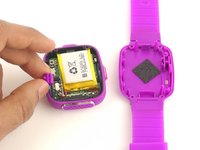
    • Gently pull the back plate from the watch casing.

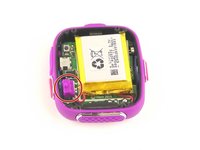
  4. Vtech Kidizoom Smart Watch DX Master Switch Replacement: 4 단계, 이미지 2개 중 1개 Vtech Kidizoom Smart Watch DX Master Switch Replacement: 4 단계, 이미지 2개 중 2개
    • Lift the master switch from the circuit board.

결론

To reassemble your device, follow these instructions in reverse order.

다른 6명이 해당 안내서를 완성하였습니다.

작성자

3다른 기여자 명과 함께

Amber Hamlet

회원 가입일: 01/20/16

387 평판

안내서 2개를 작성함

USF Tampa, Team 10-6, Remmell Spring 2016 USF Tampa, Team 10-6, Remmell Spring 2016 회원

USFT-REMMELL-S16S10G6

4 회원들

안내서 12개를 작성함

0가이드 댓글

댓글 쓰기

조회 통계:

지난 24시간: 0

지난 7일: 2

지난 30일: 22

전체 시간: 7,349