주요 콘텐츠로 건너뛰기

Weinmann VENTImotion and VENTIlogic Display Board Replacement

의료 장비
iFixit과 이 수리 안내서는 의료 기기 제조업체가 보증하지 않으며 제휴 관계가 없습니다.

필요한 것

  1. Weinmann VENTImotion and VENTIlogic Display Board Replacement, Display Board: 1 단계, 이미지 2개 중 1개 Weinmann VENTImotion and VENTIlogic Display Board Replacement, Display Board: 1 단계, 이미지 2개 중 2개
    • Open the device by following these steps:

    • Place the device on a non-slip surface with the top facing downwards

    • Remove the filter cassette from the top part of the housing.

    • Undo and remove the 6 screws (34).

    • Open the bottom of the housing (35) away to the side.

    • Undo the connecting cables for the humidifier (42) and the alarm (43).

    • Make sure the power supply plug is disconnected.

  2. Weinmann VENTImotion and VENTIlogic Display Board Replacement: 3 단계, 이미지 1개 중 1개
    • Disconnect the following:

    • encoder connector (82).

    • connectors of interfaces (84) and (85) off the control board.

  3. Weinmann VENTImotion and VENTIlogic Display Board Replacement: 4 단계, 이미지 1개 중 1개
    • Disconnect the ribbon cable of the display and the fascia film.

    • Pull the latch out until you feel resistance. You can then pull out the ribbon cable.

    • If the latch has not been opened correctly, the ribbon cable may be damaged when it is pulled out.

  4. Weinmann VENTImotion and VENTIlogic Display Board Replacement: 5 단계, 이미지 1개 중 1개
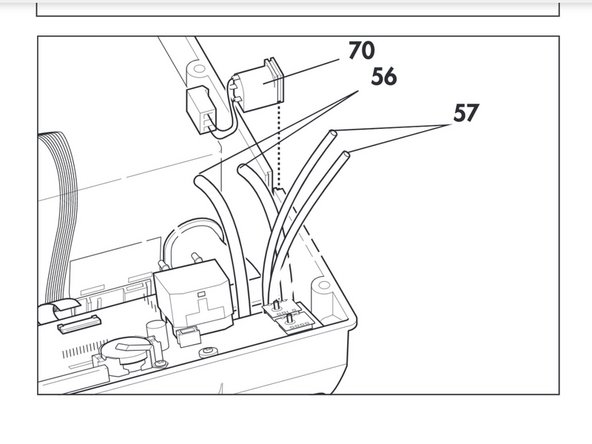
    • Pull flow measurement hoses (56) off the flow sensor.

    • Pull pressure measurement hoses (57) off the pressure sensors.

  5. Weinmann VENTImotion and VENTIlogic Display Board Replacement: 6 단계, 이미지 1개 중 1개
    • Undo the four screws (51) and remove control board (50).

  6. Weinmann VENTImotion and VENTIlogic Display Board Replacement: 7 단계, 이미지 1개 중 1개
    • Remove spring (54) from the control board and remove battery (52) (see "7.9 Replace battery on control board" on page 42).

    • Remove display

  7. Weinmann VENTImotion and VENTIlogic Display Board Replacement: 9 단계, 이미지 1개 중 1개
    • Insert a new display (49).

    • The display may not tilt and must be straight in the guides.

결론

To reassemble your device, follow these instructions in reverse order.

작성자

2다른 기여자 명과 함께

Cameron Young

회원 가입일: 04/22/19

174 평판

안내서 1개를 작성함

Cal Poly, Team S7-G19, Paton Spring 2020 Cal Poly, Team S7-G19, Paton Spring 2020 회원

CPSU-PATON-S20S7G19

3 회원들

안내서 4개를 작성함

0가이드 댓글

댓글 쓰기

조회 통계:

지난 24시간: 0

지난 7일: 1

지난 30일: 5

전체 시간: 162