주요 콘텐츠로 건너뛰기

Weinmann VENTImotion and VENTIlogic Power Board Replacement

의료 장비
iFixit과 이 수리 안내서는 의료 기기 제조업체가 보증하지 않으며 제휴 관계가 없습니다.
  1. Weinmann VENTImotion and VENTIlogic Power Board Replacement, Power Board: 1 단계, 이미지 2개 중 1개 Weinmann VENTImotion and VENTIlogic Power Board Replacement, Power Board: 1 단계, 이미지 2개 중 2개
    • Open the Device by following these steps:

    • Open the device only with the power supply plug disconnected.

    • Place the device on a non-slip surface with the top facing downwards.

    • Remove the filter cassette from the top part of the housing

    • Undo and remove the 6 screws (34)

    • Open the bottom part of the housing (35) away to the side.

    • Undo the connecting cables for the humidifier (42) and the alarm (43)

    • You can now put the bottom part of the housing (35) to one side.

  2. Weinmann VENTImotion and VENTIlogic Power Board Replacement: 2 단계, 이미지 1개 중 1개
    • Disconnect the power board connecting cable (45) from the power board (41).

  3. Weinmann VENTImotion and VENTIlogic Power Board Replacement: 3 단계, 이미지 1개 중 1개
    • Disconnect the Motor Cable

  4. Weinmann VENTImotion and VENTIlogic Power Board Replacement: 4 단계, 이미지 1개 중 1개
    • Disconnect the O2 valve/power board connecting cable (70) from the power board.

    • Disconnect all connecting cables from the control board.

    • Remove the power board from the top part of the housing.

  5. Weinmann VENTImotion and VENTIlogic Power Board Replacement: 7 단계, 이미지 1개 중 1개
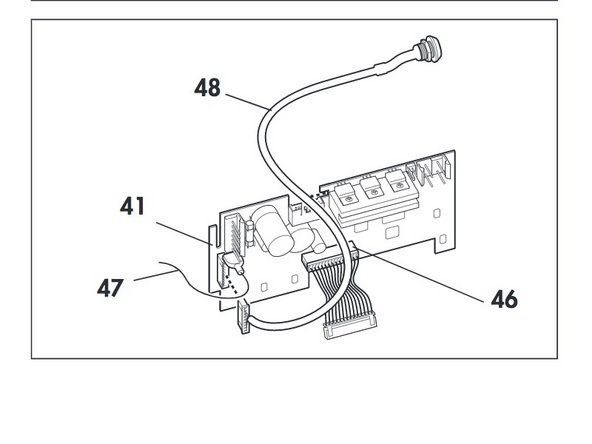
    • Take the rechargeable battery connecting cable (48) out of the groove and disconnect it from the power board (41).

  6. Weinmann VENTImotion and VENTIlogic Power Board Replacement: 8 단계, 이미지 1개 중 1개
    • Disconnect the cables of the old power board and plug them into the appropriate slots of the new power board 41:

    • –power board/control board connecting cable (46)

    • –rechargeable battery connecting cable (48)

    • –earth cable (47)

  7. Weinmann VENTImotion and VENTIlogic Power Board Replacement: 9 단계, 이미지 2개 중 1개 Weinmann VENTImotion and VENTIlogic Power Board Replacement: 9 단계, 이미지 2개 중 2개
    • Connect the power board/mains supply unit connecting cable (45) to the new power board.

    • Position the new power board in the top part of the housing.

  8. Weinmann VENTImotion and VENTIlogic Power Board Replacement: 11 단계, 이미지 1개 중 1개
    • Restore the connections to the control board.

결론

To reassemble your device, follow these instructions in reverse order.

다른 한 분이 해당 안내서를 완성하였습니다.

작성자

2다른 기여자 명과 함께

Emily Jacobson

회원 가입일: 04/06/20

288 평판

안내서 1개를 작성함

Cal Poly, Team S7-G19, Paton Spring 2020 Cal Poly, Team S7-G19, Paton Spring 2020 회원

CPSU-PATON-S20S7G19

3 회원들

안내서 4개를 작성함

0가이드 댓글

댓글 쓰기

조회 통계:

지난 24시간: 1

지난 7일: 4

지난 30일: 8

전체 시간: 211