주요 콘텐츠로 건너뛰기

Xbox 360 E Wi-Fi Card Replacement

필요한 것

  1. Xbox 360 E Wi-Fi Card Replacement, Top Panel: 1 단계, 이미지 1개 중 1개
    • Push the Spudger into the crevice between the grated top panel of the Xbox and the bottom body with the rubber feet.

    • Pull back on the spudger like a lever, keeping it pressed firmly into the crevice.

  2. Xbox 360 E Wi-Fi Card Replacement: 2 단계, 이미지 1개 중 1개
    • Slide the spudger along the separation you have created between the grated panel and the bottom body of the Xbox.

    • Periodically pull back on the spudger like a lever, keeping it pressed firmly into the crevice.

  3. Xbox 360 E Wi-Fi Card Replacement: 3 단계, 이미지 3개 중 1개 Xbox 360 E Wi-Fi Card Replacement: 3 단계, 이미지 3개 중 2개 Xbox 360 E Wi-Fi Card Replacement: 3 단계, 이미지 3개 중 3개
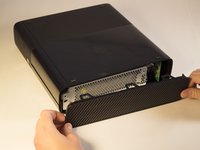
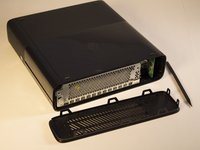
    • Continue sliding the spudger along the perimeter of the left grated face of the Xbox.

    • Pull the top panel off.

  4. Xbox 360 E Wi-Fi Card Replacement, Wi-Fi Card: 4 단계, 이미지 1개 중 1개
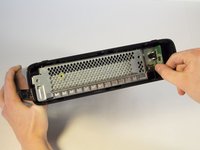
    • Remove the 11 mm screw left of the green wifi-card using the T9 Torx screw bit.

  5. Xbox 360 E Wi-Fi Card Replacement: 5 단계, 이미지 2개 중 1개 Xbox 360 E Wi-Fi Card Replacement: 5 단계, 이미지 2개 중 2개
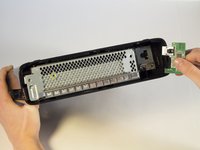
    • Firmly grip the green Wi-Fi card and pull it out of the Xbox.

결론

To reassemble your device, follow these instructions in reverse order.

다른 6명이 해당 안내서를 완성하였습니다.

작성자

5다른 기여자 명과 함께

Jennifer

회원 가입일: 02/02/14

2,079 평판

안내서 4개를 작성함

Cal Poly, Team 2-11, Amido Winter 2014 Cal Poly, Team 2-11, Amido Winter 2014 회원

CPSU-AMIDO-W14S2G11

4 회원들

안내서 44개를 작성함

1가이드 댓글

댓글 쓰기

조회 통계:

지난 24시간: 7

지난 7일: 19

지난 30일: 88

전체 시간: 11,954