주요 콘텐츠로 건너뛰기

Xbox One S All Digital Edition Plastic Enclosure Replacement

필요한 것

  1. Xbox One S All Digital Edition Plastic Enclosure Replacement, Plastic Enclosure: 1 단계, 이미지 3개 중 1개 Xbox One S All Digital Edition Plastic Enclosure Replacement, Plastic Enclosure: 1 단계, 이미지 3개 중 2개 Xbox One S All Digital Edition Plastic Enclosure Replacement, Plastic Enclosure: 1 단계, 이미지 3개 중 3개
    • Position the iFixit Opening Tool's riveted edge in between the top and bottom cover of the plastic enclosure.

    • Apply downward pressure on the iFixit Opening Tool until the security clip unlocks.

    • Repeat on different points of the plastic enclosure until the bottom cover is removed.

  2. Xbox One S All Digital Edition Plastic Enclosure Replacement: 2 단계, 이미지 2개 중 1개 Xbox One S All Digital Edition Plastic Enclosure Replacement: 2 단계, 이미지 2개 중 2개
    • Remove the six 50 mm green screws (labeled F1-F6) from the metal chassis using a Torx 10 screwdriver.

    • These screws hold the top cover of the plastic enclosure to the chassis.

  3. Xbox One S All Digital Edition Plastic Enclosure Replacement: 3 단계, 이미지 2개 중 1개 Xbox One S All Digital Edition Plastic Enclosure Replacement: 3 단계, 이미지 2개 중 2개
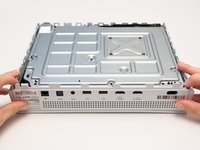
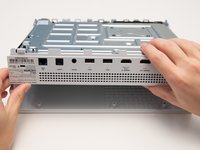
    • Apply pressure to peel off the sides of the casing.

    • Separate the metal chassis from the top cover, lifting the back of the chassis up and away from the top cover.

    • The plastic back panel is meant to stay attached to the metal chassis.

  4. Xbox One S All Digital Edition Plastic Enclosure Replacement: 4 단계, 이미지 1개 중 1개
    • Flip the metal enclosure so that the fan cover is on top.

결론

To reassemble your device, follow these instructions in reverse order.

다른 한 분이 해당 안내서를 완성하였습니다.

작성자

3다른 기여자 명과 함께

Jules Hajjar

회원 가입일: 10/10/19

1,915 평판

안내서 8개를 작성함

Cal Poly, Team S12-G6, Regan Fall 2019 Cal Poly, Team S12-G6, Regan Fall 2019 회원

CPSU-REGAN-F19S12G6

4 회원들

안내서 32개를 작성함

0가이드 댓글

댓글 쓰기

조회 통계:

지난 24시간: 3

지난 7일: 26

지난 30일: 111

전체 시간: 3,629