주요 콘텐츠로 건너뛰기
수리 커뮤니티 가입 - 계정 만들기
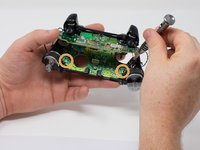
Xbox One Wireless Controller Potentiometer Replacement

필요한 것

  1. Xbox One Wireless Controller Potentiometer Replacement, Cover Plate: 1 단계, 이미지 2개 중 1개 Xbox One Wireless Controller Potentiometer Replacement, Cover Plate: 1 단계, 이미지 2개 중 2개
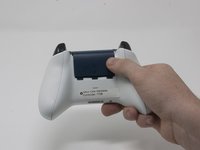
    • Slide the battery cover toward the top of the controller to remove it.

    • Lift up the batteries or the battery pack from the battery compartment.

  2. Xbox One Wireless Controller Potentiometer Replacement: 2 단계, 이미지 2개 중 1개 Xbox One Wireless Controller Potentiometer Replacement: 2 단계, 이미지 2개 중 2개
    • Insert a plastic opening tool into the top seam, and gently work the opening tool to the bottom of the controller.

    • Continue using the opening tool to gently pry the side plate off of the controller.

    • Repeat this process for the second side plate.

  3. Xbox One Wireless Controller Potentiometer Replacement: 3 단계, 이미지 1개 중 1개
    • Gently peel the battery label or punch a hole in the center of the sticker in the battery compartment to reveal the hidden screw.

    • Remove the five 9mm torx-9 security screws from the back of the controller.

  4. Xbox One Wireless Controller Potentiometer Replacement: 4 단계, 이미지 2개 중 1개 Xbox One Wireless Controller Potentiometer Replacement: 4 단계, 이미지 2개 중 2개
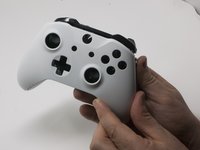
    • Orient the controller so the front plate is facing up.

    • Lift the front cover off of the controller.

  5. Xbox One Wireless Controller Potentiometer Replacement: 5 단계, 이미지 1개 중 1개
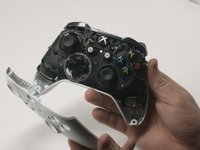
    • Turn the controller face down and gently lift the rear plate.

    • Be careful with the rumble motors, as they tend to fall out, risking damage to the motherboard.

  6. Xbox One Wireless Controller Potentiometer Replacement, Tape Shock Motors in place: 6 단계, 이미지 3개 중 1개 Xbox One Wireless Controller Potentiometer Replacement, Tape Shock Motors in place: 6 단계, 이미지 3개 중 2개 Xbox One Wireless Controller Potentiometer Replacement, Tape Shock Motors in place: 6 단계, 이미지 3개 중 3개
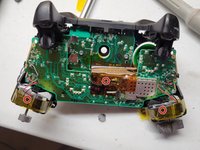
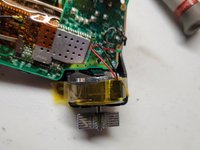
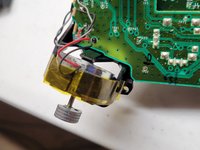
    • Tape the Rumbler/shock motors in place.

    • This will prevent the motors from falling out.

  7. Xbox One Wireless Controller Potentiometer Replacement, Directional Pad: 7 단계, 이미지 1개 중 1개
    • Turn the device over and remove the directional pad by gently pulling it away from the controller.

  8. Xbox One Wireless Controller Potentiometer Replacement, Joystick Caps: 8 단계, 이미지 1개 중 1개
    • Pull the joysticks off of the controller.

  9. Xbox One Wireless Controller Potentiometer Replacement, Top Motherboard: 9 단계, 이미지 1개 중 1개
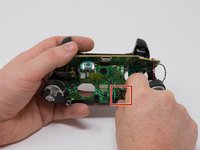
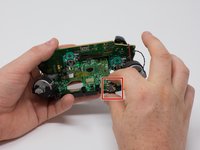
    • If the rumble motors fall out of frame, the wires may disconnect from the motherboard . The wires will have to be soldered to reattach the motor.

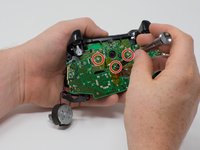
    • Turn the device over and remove the two 7mm torx-6 screws in the bottom left and right corners.

  10. Xbox One Wireless Controller Potentiometer Replacement, De-soldering required: 10 단계, 이미지 3개 중 1개 Xbox One Wireless Controller Potentiometer Replacement, De-soldering required: 10 단계, 이미지 3개 중 2개 Xbox One Wireless Controller Potentiometer Replacement, De-soldering required: 10 단계, 이미지 3개 중 3개
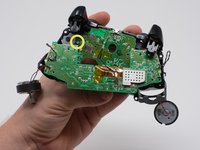
    • Firmly grasp the top and bottom motherboards in opposite hands, then gently pull them apart.

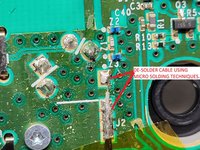
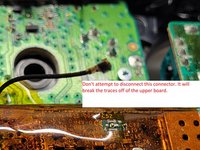
    • The top motherboard is still connected to the bottom motherboard. To fully separate the top motherboard, you will need to use a soldering iron.

    • Warning: Do not attempt to disconnect the shielded (gold colored) connector as it is extremely fragile you will break it. It runs between the two boards.

    • De-solder the shielded cable from the lower board instead of attempting to disconnect the connector. De-solder using micro soldering techniquest.

  11. Xbox One Wireless Controller Potentiometer Replacement, 3.5 mm Audio Port: 11 단계, 이미지 2개 중 1개 Xbox One Wireless Controller Potentiometer Replacement, 3.5 mm Audio Port: 11 단계, 이미지 2개 중 2개
    • Remove the audio port from the bottom mother board.

  12. Xbox One Wireless Controller Potentiometer Replacement, Bottom Motherboard: 12 단계, 이미지 3개 중 1개 Xbox One Wireless Controller Potentiometer Replacement, Bottom Motherboard: 12 단계, 이미지 3개 중 2개 Xbox One Wireless Controller Potentiometer Replacement, Bottom Motherboard: 12 단계, 이미지 3개 중 3개
    • Remove the three 70mm torx-6 screws from the center of the bottom motherboard.

    • Remove the two 70mm torx-6 screws next to the rumble motors on the bottom motherboard.

    • Remove the one 70mm torx-6 screw located on the left side of the bottom motherboard.

  13. Xbox One Wireless Controller Potentiometer Replacement: 13 단계, 이미지 1개 중 1개
    • Use a plastic spudger to lift the plastic clip off the front pegs.

    • Remove the plastic clip by sliding it upwards.

  14. Xbox One Wireless Controller Potentiometer Replacement: 14 단계, 이미지 2개 중 1개 Xbox One Wireless Controller Potentiometer Replacement: 14 단계, 이미지 2개 중 2개
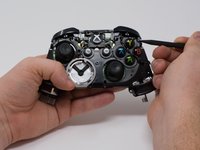
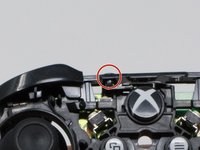
    • Use a spudger to release the small hooks at each end of the left and right bumper.

    • After you release these hooks, be careful as you separate the face plate from the back of the controller. The connect/sync button (see second image) is held in by this face plate and will come loose as you perform this step.

  15. Xbox One Wireless Controller Potentiometer Replacement: 15 단계, 이미지 1개 중 1개
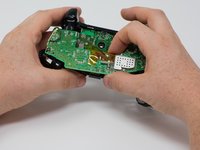
    • To avoid disconnecting the wires connected to the motherboard, lift the mother board away from the plastic frame as if opening a laptop.

  16. Xbox One Wireless Controller Potentiometer Replacement, Open the potentiometer housing: 16 단계, 이미지 3개 중 1개 Xbox One Wireless Controller Potentiometer Replacement, Open the potentiometer housing: 16 단계, 이미지 3개 중 2개 Xbox One Wireless Controller Potentiometer Replacement, Open the potentiometer housing: 16 단계, 이미지 3개 중 3개
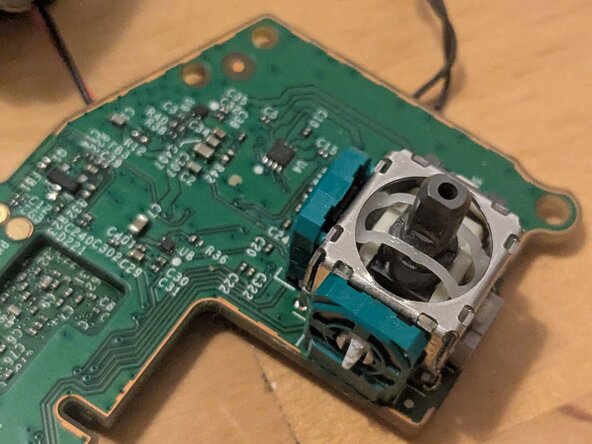
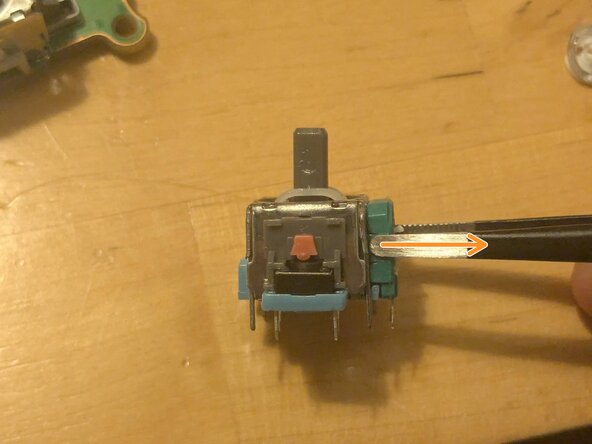
    • Use the iFixit Precision Tweesers to gently pry open the potentiometer housing by slowly levering the top edge of the plastic.

    • Bend the housing so that there is 2–3 millimeters of space at the top.

    • If you bend it too much, you risk damaging the module's solder joints.

  17. Xbox One Wireless Controller Potentiometer Replacement, Remove the damaged potentiometer: 17 단계, 이미지 2개 중 1개 Xbox One Wireless Controller Potentiometer Replacement, Remove the damaged potentiometer: 17 단계, 이미지 2개 중 2개
    • Pull the potentiometer out of its housing.

  18. Xbox One Wireless Controller Potentiometer Replacement, Take the new potentiometer: 18 단계, 이미지 3개 중 1개 Xbox One Wireless Controller Potentiometer Replacement, Take the new potentiometer: 18 단계, 이미지 3개 중 2개 Xbox One Wireless Controller Potentiometer Replacement, Take the new potentiometer: 18 단계, 이미지 3개 중 3개
    • From the replacement module, slowly separate the potentiometer housing from the module.

    • Gently press the small plastic tabs that secure the potentiometer to the center of the housing.

    • Remove the potentiometer.

  19. Xbox One Wireless Controller Potentiometer Replacement, Install the new potentiometer: 19 단계, 이미지 3개 중 1개 Xbox One Wireless Controller Potentiometer Replacement, Install the new potentiometer: 19 단계, 이미지 3개 중 2개 Xbox One Wireless Controller Potentiometer Replacement, Install the new potentiometer: 19 단계, 이미지 3개 중 3개
    • Insert the new potentiometer into the housing.

    • Gently press down with the iFixit Precision Tweezers to secure the plastic tabs in the center of the housing.

    • Make sure the plastic tabs extend all the way out of the housing and are properly aligned before securing the potentiometer.

  20. Xbox One Wireless Controller Potentiometer Replacement, Secure evetything: 20 단계, 이미지 1개 중 1개
    • Push down on the top edge of the potentiometer housing to close the gap created in step 16.

    • You should hear the plastic clips on the module click into place.

결론

To reassemble your device, follow these instructions in reverse order from step 15.

다른 한 분이 해당 안내서를 완성하였습니다.

Emanuele Artusi

회원 가입일: 10/23/24

776 평판

안내서 5개를 작성함

0가이드 댓글

댓글 쓰기

조회 통계:

지난 24시간: 13

지난 7일: 103

지난 30일: 103

전체 시간: 103