주요 콘텐츠로 건너뛰기

Xiaomi Redmi 2 Ambient Light Sensor Replacement

필요한 것

  1. Xiaomi Redmi 2 Ambient Light Sensor Replacement, Motherboard: 1 단계, 이미지 2개 중 1개 Xiaomi Redmi 2 Ambient Light Sensor Replacement, Motherboard: 1 단계, 이미지 2개 중 2개
    • Use the flat end of the spudger to remove the back panel from the mid-frame and front body.

  2. Xiaomi Redmi 2 Ambient Light Sensor Replacement: 2 단계, 이미지 1개 중 1개
    • Insert your finger into the curved opening of the mid-frame.

    • Lift the battery and remove.

  3. Xiaomi Redmi 2 Ambient Light Sensor Replacement: 3 단계, 이미지 1개 중 1개
    • Remove the SIM and/or memory cards if present.

    • Remove twelve 3.4 mm Phillips #000 screws securing the mid-frame to the front body.

  4. Xiaomi Redmi 2 Ambient Light Sensor Replacement: 4 단계, 이미지 1개 중 1개
    • Slide the spudger between the mid-frame and front body, gradually prying the two bodies apart as you slide the spudger around the perimeter of the phone.

  5. Xiaomi Redmi 2 Ambient Light Sensor Replacement: 5 단계, 이미지 1개 중 1개
    • Remove the 3.4 mm Phillips #000 screw that holds the motherboard to the front body.

    • Keep this screw separate from the initial twelve.

  6. Xiaomi Redmi 2 Ambient Light Sensor Replacement: 6 단계, 이미지 2개 중 1개 Xiaomi Redmi 2 Ambient Light Sensor Replacement: 6 단계, 이미지 2개 중 2개
    이 단계에 사용된 도구:
    Tweezers
    $4.99
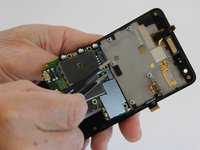
    • Using one prong of the tweezers, pry back the brown clip located on top of the LCD ribbon connector.

  7. Xiaomi Redmi 2 Ambient Light Sensor Replacement: 7 단계, 이미지 2개 중 1개 Xiaomi Redmi 2 Ambient Light Sensor Replacement: 7 단계, 이미지 2개 중 2개
    • Using one prong of the tweezers, pry the ribbon clip away from the motherboard.

  8. Xiaomi Redmi 2 Ambient Light Sensor Replacement: 8 단계, 이미지 2개 중 1개 Xiaomi Redmi 2 Ambient Light Sensor Replacement: 8 단계, 이미지 2개 중 2개
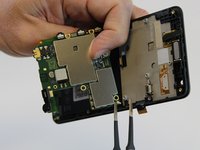
    • Lift and hinge the motherboard with your fingers.

  9. Xiaomi Redmi 2 Ambient Light Sensor Replacement: 9 단계, 이미지 2개 중 1개 Xiaomi Redmi 2 Ambient Light Sensor Replacement: 9 단계, 이미지 2개 중 2개
    • Using one prong of the tweezers, lift and pry back the metal clip positioned over the front proximity sensor ribbon connector.

  10. Xiaomi Redmi 2 Ambient Light Sensor Replacement: 10 단계, 이미지 2개 중 1개 Xiaomi Redmi 2 Ambient Light Sensor Replacement: 10 단계, 이미지 2개 중 2개
    • Using the tweezers, pull the antenna connector from the motherboard.

  11. Xiaomi Redmi 2 Ambient Light Sensor Replacement: 11 단계, 이미지 1개 중 1개
    • Lift the motherboard out of the front cover and set aside.

  12. Xiaomi Redmi 2 Ambient Light Sensor Replacement, Ambient Light Sensor: 12 단계, 이미지 1개 중 1개
    이 단계에 사용된 도구:
    Tweezers
    $4.99
    • Using one prong of the tweezers, lift and loosen the edge of the ambient light sensor from the motherboard.

  13. Xiaomi Redmi 2 Ambient Light Sensor Replacement: 13 단계, 이미지 1개 중 1개
    • Using your fingers, gently pull out the ambient light sensor.

결론

To reassemble your device, follow these instructions in reverse order.

다른 17명이 해당 안내서를 완성하였습니다.

작성자

2다른 기여자 명과 함께

Alicia Brenner

회원 가입일: 10/01/15

3,569 평판

안내서 5개를 작성함

USF Tampa, Team 1-3, Leahy Fall 2015 USF Tampa, Team 1-3, Leahy Fall 2015 회원

USFT-LEAHY-F15S1G3

2 회원들

안내서 5개를 작성함

1가이드 댓글

댓글 쓰기

조회 통계:

지난 24시간: 0

지난 7일: 4

지난 30일: 20

전체 시간: 5,558