주요 콘텐츠로 건너뛰기
수리 커뮤니티 가입 - 계정 만들기

iRobot Braava 375t Battery Replacement

필요한 것

  1. iRobot Braava 375t Battery Replacement, Battery: 1 단계, 이미지 1개 중 1개
    • Turn the device over upside down and locate the battery panel.

    • The panel has a symbol of a trash can crossed out.

  2. iRobot Braava 375t Battery Replacement: 2 단계, 이미지 1개 중 1개
    • After locating the panel, locate the screw (should be around the top center).

    • You will need a medium sized flathead screwdriver to loosen the screw.

  3. iRobot Braava 375t Battery Replacement: 3 단계, 이미지 1개 중 1개
    • Insert the screwdriver and turn counter clockwise (left) to loosen the screw.

    • You may need to apply pressure when turning if the screw is tight.

  4. iRobot Braava 375t Battery Replacement: 4 단계, 이미지 2개 중 1개 iRobot Braava 375t Battery Replacement: 4 단계, 이미지 2개 중 2개
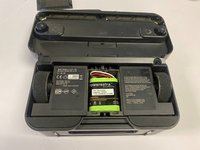
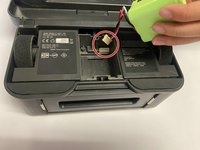
    • Once the screw is completely taken off, remove the panel to reveal the battery.

    • The battery will have a wire, follow the wire which will lead to a plastic white clip (pin). Pull the wire clip upwards carefully until the all pins are separated.

    • Use a small screwdriver and wedge the head between the clips if the pins are tight.

결론

To reassemble your device, follow these instructions in reverse order.

다른 한 분이 해당 안내서를 완성하였습니다.

작성자

5다른 기여자 명과 함께

Jadealyn Paulino

회원 가입일: 09/26/22

275 평판

안내서 1개를 작성함

CSU Los Angeles, Team 5-5, Adachi Fall 2022 CSU Los Angeles, Team 5-5, Adachi Fall 2022 회원

CSULA-ADACHI-F22S5G5

6 회원들

안내서 4개를 작성함

0가이드 댓글

댓글 쓰기

조회 통계:

지난 24시간: 1

지난 7일: 4

지난 30일: 42

전체 시간: 377