
주요 콘텐츠로 건너뛰기

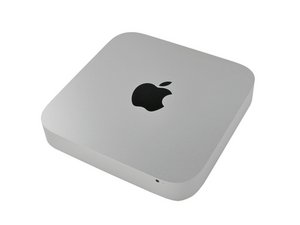
모델 번호 A1347로 식별되는 Mac mini의 유니바디 알루미늄 세대입니다 - Mid 2010부터 현재 판매되는 Late 2014 모델.

SSD drive not recognized

I bought a Sandisk Extreme II 500GB SSD with an the Mac Mini dual drive kit. The installation went well and the SSD drive was recognized by my Mac Mini, well... some of the times. Sometimes it didn't mount and I had to open Disk Utility to mount it manually. Sometimes Mac OS X (10.9 Mavericks) says that the drive is not initialized and asked me to format it, only to do so again the next time I boot.

When the Sandisk SSD is recognized by Mac OS X, it works great, but I don't trust it enough to put any serious data on it right now.

I thought something was loose so I did installation again. Same problem. Interestingly Windows 7 in Bootcamp had no problem with it, recognized it every time. Does anybody run into the same problem?

답변되었습니다! 답변 보기 저도 같은 문제가 있습니다

좋은 질문입니까?

점수 1
댓글 달기

답변 2개

선택된 해법

There are a few different possibilities here:

Apple (and some third parties) had a bad run of SATA cables. So it could be a simple issue of replacing the cable.

The other issue is the SATA I/O speed - Here you may need to check your systems firmware. Review this Apple TN" EFI and SMC firmware updates for Intel-based Macs make sure you have the newest for your system. In some cases the handshake between the drive and the system didn't work if you have an auto sensing HD/SSD. You also may want to check your SSD's firmware as well here.

Lastly, some models of Mac Mini have an issue with the optical drive's SATA port. While this OWC note is about MacBook Pro it also holds true with the mini's OWC Data Doubler it makes no difference who's unit you buy here. Note the Special compatibility notes at the bottom. Because of the issue we only use fixed SATA II (3.0 Gb/s) drives.

이 답변이 도움이 되었나요?

점수 2
댓글 달기

Turns out it's a bad SATA cable. When OS X recognizes the SSD, I could measure speed of around 250 MB/s. That's not the performance level of the Sandisk Extreme at all. So I bought a $20 SATA 3 to USB3 enclosure, slot the SSD in, and instantly saw speed of around 450 MB/s. Now I'm booting off the USB enclosure.

I can order a replacement SATA cable from iFixIt, but what can guarantee that it will work this time?

이 답변이 도움이 되었나요?

점수 0

댓글 1개:

Can you give us the last four digits of your serial number so we can tell if your system can support the SSD.

댓글 달기

답변을 추가하세요

Scott 영원히 감사할 것입니다.
조회 통계:

지난 24시간: 1

지난 7일: 1

지난 30일: 7

전체 시간: 4,889
