주요 콘텐츠로 건너뛰기

Wi-Fi 전용 버전의 Apple iPad Air(모델 번호 A1474)입니다. 스페이스 그레이 또는 실버 색상으로 제공되며 맞춤형 A7 프로세서가 탑재되어 있고 16, 32, 64 및 128GB 용량으로 제공됩니다.

Screen jumping with new digitizer/glass

I have replaced a client's iPad air glass/digitizer with a new one and it tested fine before closing up. Once the internal protective sheet and adhesive were removed and the glass pressed down, the screen takes on a life of its own.

I have since tried another glass panel and had the same issues.

This time I was able to narrow down the cause to the upper folded ribbon for the touch interface (you will recall there are three ribbons and two plugs, the top one is the culprit).

I have NOT folder these ribbons flat, they are stuck to the screen in the same location/depth as the original ones were...

(I am am an experienced fitter, well into 3 figures on ipads and phones etc. but this is only the 3rd Air we have had...)

Please help!

Cheers,

Marc

이 질문에 답하기 저도 같은 문제가 있습니다

좋은 질문입니까?

점수 5
댓글 1개

I am having the same problem and have used 3 different digis. Would love a fix

댓글 달기

답변 3개

가장 유용한 답변

Here is your solution -

solution to phantom/ghost touches ipad air

이 답변이 도움이 되었나요?

점수 2
댓글 달기

Hi there first this is make sure you haven't been any pins on the board were the screen plugs in..

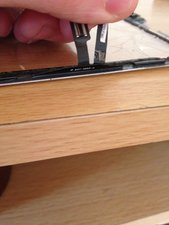
Now here is a pic of the cables these should be lifted up off the glass and not stuck to the glass as there is a little gap just beside the frame were they slot in make sure you haven't the cables crushed between the glass and frame

Block Image

이 답변이 도움이 되었나요?

점수 0
댓글 달기

Pinching the flex can definitely happen when installing these screens, also we had a bad batch of about 3 faulty screens when we first started doing these. con is right, the flex needs to not be resting on the glass and fed through the gap on the frame where the flex goes. Either pinched flex or faulty parts I would say.

이 답변이 도움이 되었나요?

점수 0
댓글 달기

답변을 추가하세요

Marc 영원히 감사할 것입니다.
조회 통계:

지난 24시간: 0

지난 7일: 1

지난 30일: 12

전체 시간: 13,572