
주요 콘텐츠로 건너뛰기

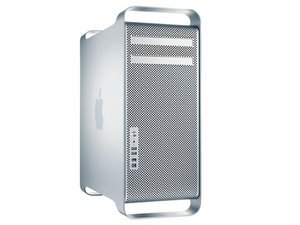
Mac Pro First Generation는 Apple Inc.이 제조한 Intel Xeon-기반 워크 스테이션 컴퓨터입니다. 2006년부터 2008년까지의 컴퓨터가 1 세대 모델에 포함됩니다.

Flashing grey question mark after iTunes update and restart?

I've just bought a 2008 Mac Pro EMC No:2138 running OS X El Capitan version 10.11.

It was working fine until it asked me if I wanted do upgrade to the newer version of iTunes. I accepted and then clicked on the "restart now" option to complete upgrade.

Upon restart the machine took me to the grey flashing question mark screen. I have tried all start up command combinations, none work except holding the option key which takes me to start up manager. I select desired disc and the screen turns grey, no flashing question mark just a grey screen. I have replaced the PRAM battery as I understand that it can cause boot up problems if it is dead.

Still no luck. Any ideas or suggestions would be much appreciated. Thanks

답변되었습니다! 답변 보기 저도 같은 문제가 있습니다

좋은 질문입니까?

점수 0
댓글 달기

답변 1개

선택된 해법

Lets create a bootable OS installer as you’ve got a messed up drive. Follow this guide with a fresh USB thumb drive: How to make a bootable OS X 10.10 Yosemite install drive

You’ll need to get some help from a friend that has a Mac that can down load the OS-installer from the Apps Store. While Apple is pushing Mojave for now I would stick with Yosemite for now.

If you have anything important on the system now you’ll want to back it up onto an external drive before doing anything.

Using the external OS installer drive I would run Disk Utility to wipe the drive and then do a full install. Do keep in mind your system will restart a few times let it do its thing at the end the installer will ask you if you have anything that needs to be restored. This is the point where you can use your backup drive to recover the user accounts as well as the Apps & data.

이 답변이 도움이 되었나요?

점수 2

댓글 3개:

OK so I just took both hard drives into the shop, they told me one was toast and they reinstalled os x on the other. I placed good hard drive with os x back in and same problem, so I'm lead to believe hard drive is fine and os x is on there but just doesn't boot. When I restart holding option the drive comes up but when I click on it, it takes me to a grey screen only?

I'm thinking you need to update the systems firmware: Apple Mac Pro firmware update page

OK so I had to do a complete reinstall of OS X 10.11 and make sure all automatic updates were turned off. System seems to be working fine now. Seems that just the update of iTunes only was enough to crash the system. Thanks heaps to all that spent their time trying to help me solve this issue. Many thanks!

댓글 달기

답변을 추가하세요

Ozrockremedy 영원히 감사할 것입니다.
조회 통계:

지난 24시간: 0

지난 7일: 0

지난 30일: 4

전체 시간: 111
