

주요 콘텐츠로 건너뛰기

A1708/EMC 3164 — 2017년 6월 출시, 이 기본 레벨 MacBook Pro는 (OLED Touch Bar가 아닌) 기존의 function keys를 유지합니다.

Removing 128GB SSD From MacBook Pro 2017 into a Reader?

Hello everyone,

Recently my wife spilled some some water onto her MacBook Pro and it won’t turn on currently.

Is there a way to take the Apple 128 GB SSD and place it into an enclosure to read it on another mac by any chance? Or, can I use MacBook Pro can I swap out the drive get her items off?

We both have 2017 Macbook Pro 13” systems. I tried searching for a case but didn't see it.

This is the drive I took out:
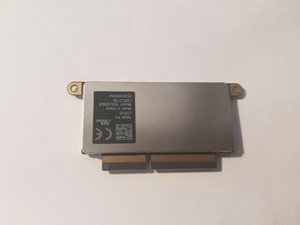
Block Image

https://imgur.com/a/PJyPifZ

Thanks!

답변되었습니다! 답변 보기 저도 같은 문제가 있습니다

좋은 질문입니까?

점수 0
댓글 2개

Try to look for a reputable independent repair shop in your area, they usually have means of transferring data. Might be easier than finding an enclosure.

Thank you for the reply as well! I’m going to swap out hard drive from her mac to my Mac @pomikoli

댓글 달기

답변 1개

선택된 해법

@antdogs - Sorry to say there is no adapter cases to hold this version of Apple SSD.

If you both have the exact same system (both are function key models) then you could swap over the SSD drives. Before you do make sure you’ve made a backup of your systems data as well as create a bootable external drive as you may needed it to salvage your wife’s drives data.

Follow this guide first steps (1 ~ 15) MacBook Pro 13" Function Keys 2017 배터리 교체

Then disconnect the left Speaker unit and remove it which is just in front of the SSD Drive, Peel off the tape from the drives case and the logic board connector and remove the two screws holding it in (I would mark your wife’s drive with a sharpie marker so you know which is which.

Follow the same process on your system. Reverse the procedure installing your wife’s drive in your system and hopefully it starts up. If not use the external drive you have setup. Good Luck!

이 답변이 도움이 되었나요?

점수 1

댓글 9개:

Ahhh thank you! I was looking through for hours and did not see any adapter/external reader like i do with my esata hard drives. I already took the hard drive out of her computer, I wanted to be sure if there would be be any conflict if I put her hard drive in my machine. I will try this today and boot up her hard drive on my machine and copy items over.

thank you very much!

@antdogs - Let us know how it goes!

Don't forget to score the answer and accept it if you if are up and running!

I definitely will! One more question both of our computers aren’t encrypted, so when I boot up her machine it will be like her computer turning on correct?

Yes, it should! You will need to use here user account and password to access the files.

Awesome thanks so much! I will do that today and let you know!

댓글 4개 더보기

댓글 달기

답변을 추가하세요

Anthony Thornton 영원히 감사할 것입니다.
조회 통계:

지난 24시간: 0

지난 7일: 3

지난 30일: 11

전체 시간: 1,490
