
주요 콘텐츠로 건너뛰기

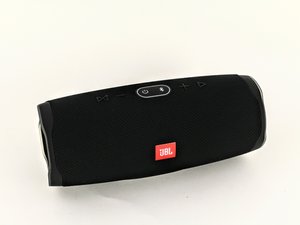
The JBL Charge 4 is a waterproof, Bluetooth capable speaker that additionally functions as a portable charger for smartphones. It is identifiable by its model number: CHARGE4S.

Speaker turns itself on when not plugged in?

I bought this speaker because the seller said that it would not power on. I played around with some of the button combos and reset the jbl and now got it to power on. I tested it with service mode and made sure it is not in service mode. The problem is when I turn the speaker off while it is not charging, it automatically turns itself on (even if it isn't connected to anything via bluetooth). The weird thing is that when it is plugged in, it works fine and will stay off when turned off and works fine in general. I have tried all the different suggestions and even took the battery out, nothing has worked.

이 질문에 답하기 저도 같은 문제가 있습니다

좋은 질문입니까?

점수 1
댓글 달기

답변 3개

We are having the exact same problem. Have you been able to determine if its at least a hardware or a software issue?

Our speaker is on the 3.0.0 firmware - some searching seems to show there is a 3.4.0 firmware that is available. What version is yours on?

When you pulled it apart to get to the battery did you have a look at the power buttons? Was there any possible physical fault, or was anything sticking?

이 답변이 도움이 되었나요?

점수 0

댓글 1개:

It doesn't seem to be a hardware issue and I updated my software and I am still having problems. There aren't a lot of answers on the internet besides letting it die, factory resetting it, taking it out of service mode (if it were somehow accidentally put into service mode), and just updating it. I might just try calling customer support but idk how much they would help me since I bought mine used on eBay.

댓글 달기

How the heck do you update the firmware on this thing? Win 10 Device Manager doesn't give an option for updating anything with this speaker.

이 답변이 도움이 되었나요?

점수 0
댓글 달기

Hi Guys,

I have similar issue with my JBL Flip 5.

I found nothing on internet how to fix this issue.

Help .... please.

Mise à jour (04/12/25)

Block Image

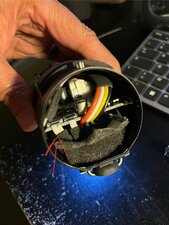
See attached the picture where the ribbon i removed and reconnected is located.

이 답변이 도움이 되었나요?

점수 0

댓글 6개:

I am able to fix mine by opening it up and disconnecting the ribbon cable from the buttons and reconnecting it, then it turns on and off like normal.

@tpro17 - Thank you for your sharing. I am going to try your fix with mine. Cross the fingers.

@zz57 you want to open up the right side iirc, there's videos on YouTube how to disassemble. You just need to pop the outer casing off, and then the right side speaker cover

@tpro17 Thank you, i will try this week-end.

@tpro17 Thank you, il works now!! Amazing!!

But for me, it works by removing and reconnecting the ribbon cable located at the opposite of the speaker. It is the one near the battery providing the power to internal card.

Thank you very much for Your sharing.

댓글 1개 더보기

댓글 달기

답변을 추가하세요

Gary 영원히 감사할 것입니다.
조회 통계:

지난 24시간: 2

지난 7일: 14

지난 30일: 92

전체 시간: 2,769