
Top Case is cracking where open and close
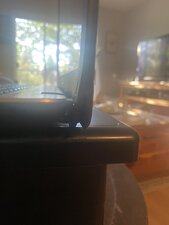
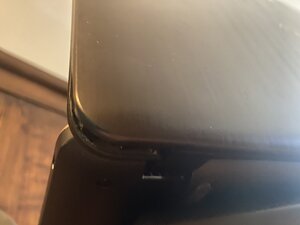
Gah, I love this computer! It’s cracking in the corner on the right side. I leave it open now. I don’t want to buy a new laptop. Help
좋은 질문입니까?
점수
0

평판: 1
 1
1
Gah, I love this computer! It’s cracking in the corner on the right side. I leave it open now. I don’t want to buy a new laptop. Help
좋은 질문입니까?

평판: 83.1k
132
 67
67
 103
103
I've run into a similar situation with a Chromebook. The problem is that the place inside the lid where the hinges mount is subject to substantial stress every time you open and close the laptop. On yours the hinge is secured by brass nuts that are molded into the lid. Over time the plastic holding the nuts wears and cracks until it releases the nuts. When that happens the hinge starts to stress the clips holding the front bezel to the rear cover until they finally start separating, exactly what you're seeing.
The proper fix for this would be to remove the front bezel and the LCD, then replace the top lid. However, it may be possible to fix the problem by using epoxy to fix the nuts back into the plastic. Although this video is for a different model, I believe the procedure should be roughly the same for yours
Computer Screen Hinge Repair for the Asus Vivobook - YouTube
One interesting part about this particular video is that the guy figured out how to lessen the tension on the hinge so that it's easier to open, which will in turn reduce the stress on those nuts. That should make the repair last longer, although the tradeoff may be that the screen might not stay in place as well as it used to, but the tension can be adjusted so it looks like it can be tweaked until it reaches a happy medium.
I might note here that I'm not sure it's entirely necessary to completely remove the hinges; if it was my computer I wouldn't bother opening the bottom cover; instead just remove the display then unscrew the nuts and glue them in place. If you're just going to replace the top cover then taking the hinges out from the body of the laptop is definitely not necessary.
이 답변이 도움이 되었나요?

평판: 98.2k
418
296
158
Ran into this on an X53E on the lower base, where the palmrest cracked - thankfully, that was minor and resolved by removing the screw. The problem with the back lid is that if it is plastic, you'll need a new rear LCD assembly :-(. However, if it's the standard Asus aluminum and plastic mount and it's intact otherwise, you can use JB-Weld to reattach the plate, ensuring it will never break again due to poor adhesive. That said JB Weld will not save you if it's the plastic cracking, but if it's just displaced, not where the original adhesive is and put it back on the machine with JB Weld or standard epoxy.
이 답변이 도움이 되었나요?
It’s the plastic part of the case and yes it’s where the LCD is,
지난 24시간: 1
지난 7일: 5
지난 30일: 34
전체 시간: 163

댓글 3개
@sevnichols sounds like you have some issues with the hinges. Post some good pictures of that area that is cracking with your question. that way we can see what you see.
기존 질문에 이미지 추가하기
oldturkey03 의
@oldturkey03 Hopefilly it's the alimum backplate so it can be fixed with JB-weld or other epoxy.
Nick 의
@oldturkey03 not it’s NOT the hinges - it’s the actual case which is separating from the edges
sev nichols 의