

 2
2 Can't remove lower case, also the manual seems wrong
i'm trying to open my laptop to clean the fan, but can't open the lower case.
i'm using this manual
Lenovo IdeaPad 5 (14″, 05) Hardware Meaintenance And Service Manual
that should be the right one as the model is IdeaPad 5 14ALC05 82LM
following the manual first of all it tells to remove 9 screws when my laptop has only 7 (the other two aren't missing, there's 2 fewer holes than described).
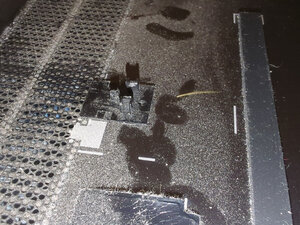
anyway i remove every screw, pop all the clips on the 4 sides and now the borders are free to flex upwards and move around a bit, but there seems to be something holding the cover in place, from roughly the center.
Nothing like this is mentioned in the manual and in every tutorial video i looked up the cover just lifts off without effort after popping the clips.
has anyone encountered the same problem?
좋은 질문입니까?

 398
398  1.5k
1.5k 
댓글 3개
What about screw hidden under stickers, rubber plugs
Nige56 의
there's no stickers left on the bottom, also the places where the feet are placed can move around, so there doesn't seem to be a hidden screw under a foot
buci 의
Can you post a picture of the bottom of the laptop please?
Nige56 의