소개
When using a drone, the propellors rotate and move so that the drone can function. As a result, the propellors are a component that will experience heavy wear and tear throughout the lifetime of the device.
If your drone has a broken propellor (diagnosed either by observation or through our troubleshooting page), replace it with this guide. There are no required tools for this replacement.
필요한 것
-
-
Power off the drone by holding down the power button.
-
Remove the battery by disconnecting it from the main battery connector.
-
Press the power button again to ensure all electricity is discharged.
-
-
-
-
Hold down the motor assembly and twist the propeller clockwise to unlock it (you should feel some resistance until it starts to unscrew freely).
-
Hold down the motor assembly and twist the propeller counterclockwise to unlock it (you should feel some resistance until it starts to unscrew freely).
-
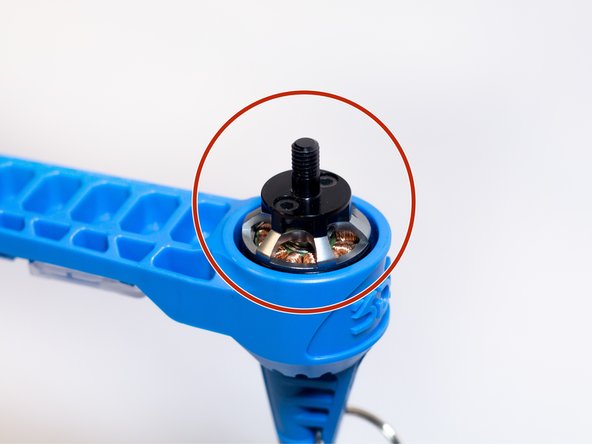
This is the motor assembly.
-


To reassemble your device, follow these directions in reverse order.
다른 한 분이 해당 안내서를 완성하였습니다.


팀

Cal Poly, Team S7-G5, Regan Winter 2020 Cal Poly, Team S7-G5, Regan Winter 2020 회원
CPSU-REGAN-W20S7G5
5 회원들
안내서 9개를 작성함
