주요 콘텐츠로 건너뛰기

8BitDo SN30 Pro+ Controller Analog Sticks Replacement

필요한 것

  1. 8BitDo SN30 Pro+ Controller Analog Sticks Replacement, Remove Battery: 1 단계, 이미지 3개 중 1개 8BitDo SN30 Pro+ Controller Analog Sticks Replacement, Remove Battery: 1 단계, 이미지 3개 중 2개 8BitDo SN30 Pro+ Controller Analog Sticks Replacement, Remove Battery: 1 단계, 이미지 3개 중 3개
    • Place the controller face down.

    • Remove the battery cover.

    • Remove rechargeable battery or AA batteries.

  2. 8BitDo SN30 Pro+ Controller Analog Sticks Replacement, Remove Trigger Buttons: 2 단계, 이미지 2개 중 1개 8BitDo SN30 Pro+ Controller Analog Sticks Replacement, Remove Trigger Buttons: 2 단계, 이미지 2개 중 2개
    • Remove L2 and R2 trigger buttons by pushing them away from the grips.

  3. 8BitDo SN30 Pro+ Controller Analog Sticks Replacement, Remove Screws: 3 단계, 이미지 2개 중 1개 8BitDo SN30 Pro+ Controller Analog Sticks Replacement, Remove Screws: 3 단계, 이미지 2개 중 2개
    이 단계에 사용된 도구:
    Tweezers
    $4.99
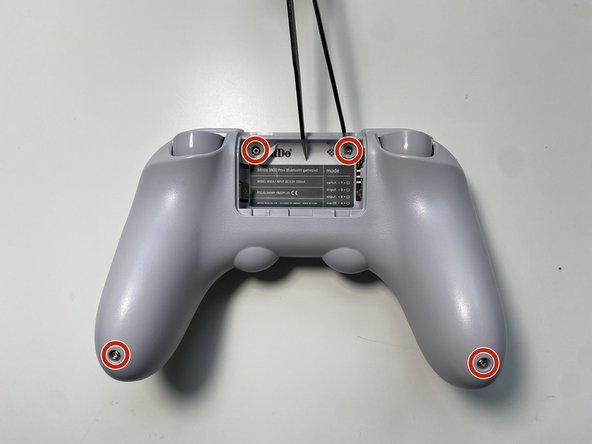
    • Use Tweezers to uncover two screws under the label in the battery compartment.

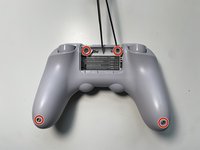
    • Use a T6 screwdriver to remove the four 7.3 mm screws securing the rear cover.

  4. 8BitDo SN30 Pro+ Controller Analog Sticks Replacement, Unclip Covers: 4 단계, 이미지 3개 중 1개 8BitDo SN30 Pro+ Controller Analog Sticks Replacement, Unclip Covers: 4 단계, 이미지 3개 중 2개 8BitDo SN30 Pro+ Controller Analog Sticks Replacement, Unclip Covers: 4 단계, 이미지 3개 중 3개
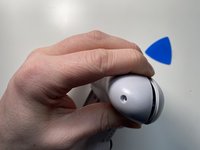
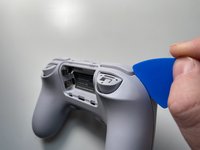
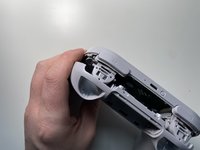
    • At the end of each grip, pry apart the covers.

    • Use fingernail or opening pick to undo the two top clips.

    • One clip next to L button.

    • One clip next to R button

    • Undo the final clip between the joysticks.

  5. 8BitDo SN30 Pro+ Controller Analog Sticks Replacement, Separate Covers: 5 단계, 이미지 1개 중 1개
    • Carefully move the rear cover away and from the front cover. Place it to the left.

    • Do not completely separate. The two halves are still attached via a white ribbon cable.

  6. 8BitDo SN30 Pro+ Controller Analog Sticks Replacement, Remove Ribbon Cable: 6 단계, 이미지 3개 중 1개 8BitDo SN30 Pro+ Controller Analog Sticks Replacement, Remove Ribbon Cable: 6 단계, 이미지 3개 중 2개 8BitDo SN30 Pro+ Controller Analog Sticks Replacement, Remove Ribbon Cable: 6 단계, 이미지 3개 중 3개
    • Unlock the ribbon cable by push open the black plastic tab.

    • The tab will slide about 1.5mm

    • Pull the ribbon cable out of the connector in the direction of the cable.

  7. 8BitDo SN30 Pro+ Controller Analog Sticks Replacement, Remove Caps: 7 단계, 이미지 2개 중 1개 8BitDo SN30 Pro+ Controller Analog Sticks Replacement, Remove Caps: 7 단계, 이미지 2개 중 2개
    • Grab the top and pull straight up on the joystick cap. Pulling out the caps one-by-one.

  8. 8BitDo SN30 Pro+ Controller Analog Sticks Replacement, Remove Screws: 8 단계, 이미지 3개 중 1개 8BitDo SN30 Pro+ Controller Analog Sticks Replacement, Remove Screws: 8 단계, 이미지 3개 중 2개 8BitDo SN30 Pro+ Controller Analog Sticks Replacement, Remove Screws: 8 단계, 이미지 3개 중 3개
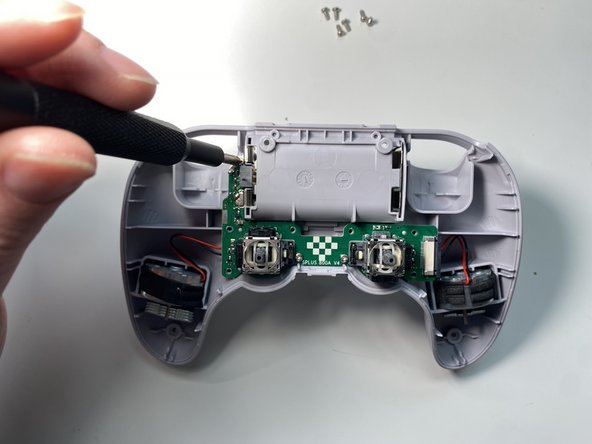
    • Use a Phillips screwdriver to remove the nine 5.2 mm screws securing the rear circuit board.

    • Four around the Right stick

    • Four around the Left stick

    • One next to the Battery connector

  9. 8BitDo SN30 Pro+ Controller Analog Sticks Replacement, Separate Rear Board: 9 단계, 이미지 3개 중 1개 8BitDo SN30 Pro+ Controller Analog Sticks Replacement, Separate Rear Board: 9 단계, 이미지 3개 중 2개 8BitDo SN30 Pro+ Controller Analog Sticks Replacement, Separate Rear Board: 9 단계, 이미지 3개 중 3개
    • Pull the two rumble motors out of their housings.

    • Grab the analog sticks to pull out the circuit board

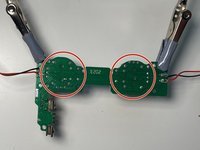
  10. 8BitDo SN30 Pro+ Controller Analog Sticks Replacement, Desolder Analog Sticks: 10 단계, 이미지 3개 중 1개 8BitDo SN30 Pro+ Controller Analog Sticks Replacement, Desolder Analog Sticks: 10 단계, 이미지 3개 중 2개 8BitDo SN30 Pro+ Controller Analog Sticks Replacement, Desolder Analog Sticks: 10 단계, 이미지 3개 중 3개
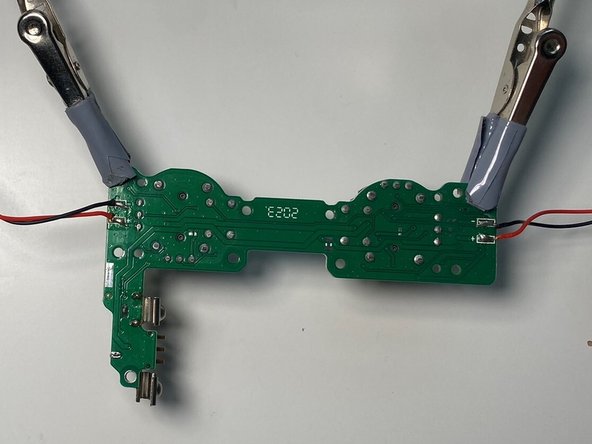
    • Flip over the rear board.

    • Using a soldering iron to desolder all the joints of the analog sticks.

    • Make sure all the solder holes are open on the circuit board.

    • Refer to the following solder guide if necessary: How To Solder and Desolder Connections

결론

To reassemble your device, follow these instructions in reverse order.

다른 3명이 해당 안내서를 완성하였습니다.

작성자

1다른 기여자 명과 함께

Brian W

회원 가입일: 12/21/11

1,773 평판

안내서 8개를 작성함

5가이드 댓글

Thanks for the guide! What form factor does the sn30 use for its sticks?

Joshua Randall - 답글

Ever figure it out? I'm wondering the same.

Peter Hindes -

I asked 8BitDo directly and they sent me this link https://tech.alpsalpine.com/e/products/d...

Stepan Orda -

im just trying to replace the worn out joystick wtf

JonnyRoboto - 답글

Great guide, thanks! I only needed to get as far as replacing the caps but was useful to know where the hidden screws and clips were ahead of time.

Liam Jackson - 답글

댓글 쓰기

조회 통계:

지난 24시간: 5

지난 7일: 36

지난 30일: 195

전체 시간: 12,826