주요 콘텐츠로 건너뛰기
수리 커뮤니티 가입 - 계정 만들기

Canon EOS 30 Grip Replacement

필요한 것

  1. Canon EOS 30 Grip Replacement, Front Panel: 1 단계, 이미지 1개 중 1개
    • Remove the two 4.8 mm black screws above the lens on the front of the camera.

  2. Canon EOS 30 Grip Replacement: 2 단계, 이미지 1개 중 1개
    • Remove the 4.3 mm black screw under the lens ring, and the 4.8 mm black screw under the camera.

  3. Canon EOS 30 Grip Replacement: 3 단계, 이미지 1개 중 1개
    • Remove the 4.8 mm black screw on the left side of the camera.

  4. Canon EOS 30 Grip Replacement: 4 단계, 이미지 1개 중 1개
    • Remove the front panel by lifting it away from the camera's body.

  5. Canon EOS 30 Grip Replacement, Top Panel: 5 단계, 이미지 1개 중 1개
    • Slide the outer eyepiece upward to remove it.

  6. Canon EOS 30 Grip Replacement: 6 단계, 이미지 1개 중 1개
    • Remove the two 4.75 mm black screws located on the top of the camera.

  7. Canon EOS 30 Grip Replacement: 7 단계, 이미지 1개 중 1개
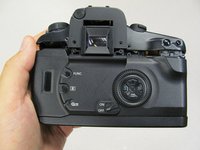
    • Remove the four 4.3 mm black screws near the bottom corners of the eyepiece at the back of the camera.

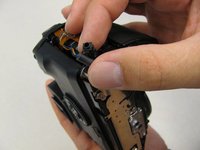
  8. Canon EOS 30 Grip Replacement: 8 단계, 이미지 2개 중 1개 Canon EOS 30 Grip Replacement: 8 단계, 이미지 2개 중 2개
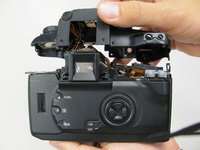
    • Slowly separate the top panel from the camera by pushing it upward.

    • Separating the top panel too far or quickly can damage the ribbon cable and connecting wires that are still attached to the top panel of the camera.

  9. Canon EOS 30 Grip Replacement, Side Panel With Remote Control Socket: 9 단계, 이미지 1개 중 1개
    • Remove two 6.5 mm black screws from the panel.

  10. Canon EOS 30 Grip Replacement: 10 단계, 이미지 1개 중 1개
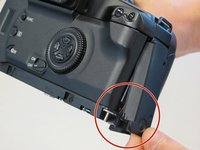
    • Remove the plastic remote control socket cap by pulling it straight out.

  11. Canon EOS 30 Grip Replacement: 11 단계, 이미지 2개 중 1개 Canon EOS 30 Grip Replacement: 11 단계, 이미지 2개 중 2개
    • Slide the panel toward the bottom of the camera to remove.

  12. Canon EOS 30 Grip Replacement: 12 단계, 이미지 1개 중 1개
    • Remove the single 4.8 silver screw from the control socket.

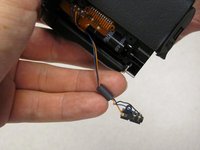
  13. Canon EOS 30 Grip Replacement: 13 단계, 이미지 2개 중 1개 Canon EOS 30 Grip Replacement: 13 단계, 이미지 2개 중 2개
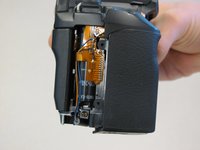
    • The control socket is now secure by three wires.

    • Desolder connections to replace the remote control socket.

  14. Canon EOS 30 Grip Replacement, Grip: 14 단계, 이미지 1개 중 1개
    • Remove the two 5.5 mm screws from front of camera.

  15. Canon EOS 30 Grip Replacement: 15 단계, 이미지 1개 중 1개
    • Remove grip panel.

결론

To reassemble your device, follow these instructions in reverse order.

작성자

8다른 기여자 명과 함께

Jackie

회원 가입일: 04/17/11

257 평판

안내서 3개를 작성함

Cal Poly, Team 8-8, Regan Spring 2011 Cal Poly, Team 8-8, Regan Spring 2011 회원

CPSU-REGAN-S11S8G8

5 회원들

안내서 22개를 작성함

1가이드 댓글

Didn't you forget the step to remove the bottom plate?

Sino Lino - 답글

댓글 쓰기

조회 통계:

지난 24시간: 3

지난 7일: 13

지난 30일: 76

전체 시간: 4,416