주요 콘텐츠로 건너뛰기

Dymo LabelManager 280 Screen Replacement

필요한 것

  1. Dymo LabelManager 280 Screen Replacement, Rear Case: 1 단계, 이미지 2개 중 1개 Dymo LabelManager 280 Screen Replacement, Rear Case: 1 단계, 이미지 2개 중 2개
    • Remove battery.

    • Remove the label cassette.

  2. Dymo LabelManager 280 Screen Replacement: 2 단계, 이미지 2개 중 1개 Dymo LabelManager 280 Screen Replacement: 2 단계, 이미지 2개 중 2개
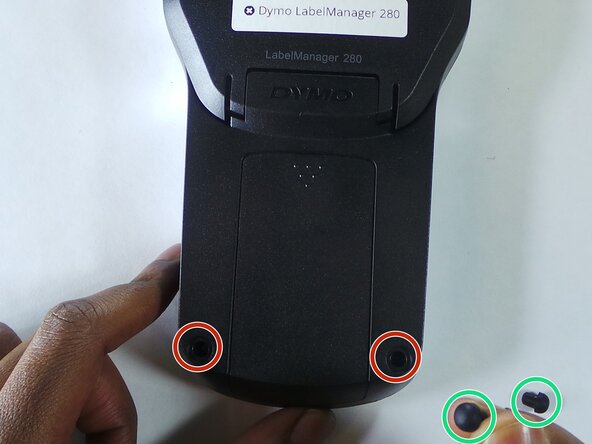
    • Remove the two rubber feets

    • Remove the 6 screws in the indicated places. These particular screws are 2mm x 8mm Phillips #0 head

  3. Dymo LabelManager 280 Screen Replacement: 3 단계, 이미지 2개 중 1개 Dymo LabelManager 280 Screen Replacement: 3 단계, 이미지 2개 중 2개
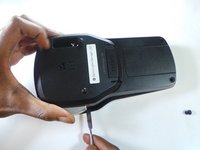
    • Use the spudger to take apart the device by insterting it as shown in the picture and twisting it. This should be done all around the device to ensure the two parts split correctly.

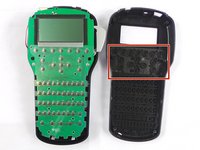
    • The keys/buttons highlighted in the second picture fall out easily so be careful. Keep device faced down in order to keep them from falling.

  4. Dymo LabelManager 280 Screen Replacement, Screen: 4 단계, 이미지 1개 중 1개
    • Further remove the 2 screws (1.2mm X 4mm Phillips #0 head).

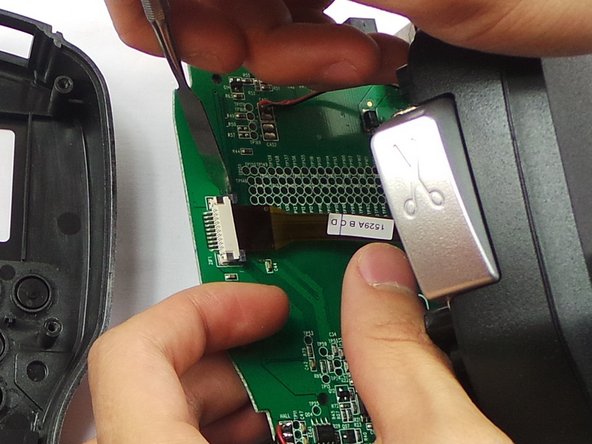
  5. Dymo LabelManager 280 Screen Replacement: 5 단계, 이미지 2개 중 1개 Dymo LabelManager 280 Screen Replacement: 5 단계, 이미지 2개 중 2개
    • Detach the ribbon cable.

  6. Dymo LabelManager 280 Screen Replacement: 6 단계, 이미지 1개 중 1개
    • Remove the screen.

결론

To reassemble your device, follow these instructions in reverse order.

다른 한 분이 해당 안내서를 완성하였습니다.

작성자

5다른 기여자 명과 함께

Steven Nguyen

회원 가입일: 02/08/16

431 평판

안내서 3개를 작성함

USF Tampa, Team 6-5, Eyestone Spring 2016 USF Tampa, Team 6-5, Eyestone Spring 2016 회원

USFT-EYESTONE-S16S6G5

3 회원들

안내서 4개를 작성함

1가이드 댓글

Hi, thak you for the tutorial, it seems pretty simple. Do you know where to find the LCD screen, or whats the specs, maybe I can find it at AliExpress.

Jacques Maltais - 답글

댓글 쓰기

조회 통계:

지난 24시간: 4

지난 7일: 10

지난 30일: 31

전체 시간: 4,359