주요 콘텐츠로 건너뛰기

Motorola Moto G Stylus (2022) Camera Bezel Replacement

단지 전제 조건
이 가이드는 전제 조건 전용 가이드입니다! 이 가이드는 다른 절차의 일부이며 단독으로 사용할 수 없습니다.

필요한 것

  1. Motorola Moto G Stylus (2022) Camera Bezel Replacement, Heat the edge: 1 단계, 이미지 1개 중 1개
    • Discharge your battery to 25% or lower and power off your phone before you begin.

    • Heat an iOpener and apply it to the edge of the back cover with the SIM card slot for two minutes.

    • A hair dryer or heat gun may also be used, but be careful not to overheat the phone—the display and internal battery are both susceptible to heat damage.

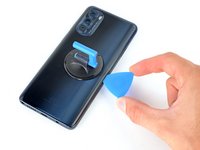
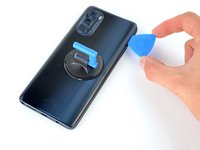
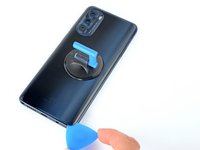
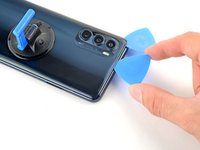
  2. Motorola Moto G Stylus (2022) Camera Bezel Replacement, Insert an opening pick: 2 단계, 이미지 3개 중 1개 Motorola Moto G Stylus (2022) Camera Bezel Replacement, Insert an opening pick: 2 단계, 이미지 3개 중 2개 Motorola Moto G Stylus (2022) Camera Bezel Replacement, Insert an opening pick: 2 단계, 이미지 3개 중 3개
    • Apply a suction cup to the back cover, as close to the center of the right edge as possible.

    • Pull up on the suction cup with strong, steady force to create a gap between the cover and the frame.

    • Insert an opening pick into the gap.

  3. Motorola Moto G Stylus (2022) Camera Bezel Replacement, Slice the right adhesive: 3 단계, 이미지 3개 중 1개 Motorola Moto G Stylus (2022) Camera Bezel Replacement, Slice the right adhesive: 3 단계, 이미지 3개 중 2개 Motorola Moto G Stylus (2022) Camera Bezel Replacement, Slice the right adhesive: 3 단계, 이미지 3개 중 3개
    • Slide your opening pick back and forth along the right edge to slice through the adhesive.

    • Leave the pick in at the bottom right corner to prevent the adhesive from resealing.

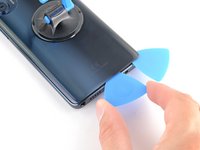
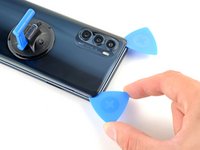
  4. Motorola Moto G Stylus (2022) Camera Bezel Replacement, Slice the bottom adhesive: 4 단계, 이미지 2개 중 1개 Motorola Moto G Stylus (2022) Camera Bezel Replacement, Slice the bottom adhesive: 4 단계, 이미지 2개 중 2개
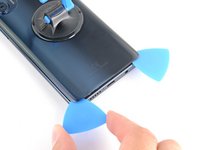
    • Insert a second opening pick into the bottom right corner.

    • Slide this opening pick along the bottom edge to the bottom left corner to slice through the adhesive.

    • Leave the pick inserted to prevent the bottom edge from resealing.

  5. Motorola Moto G Stylus (2022) Camera Bezel Replacement, Slice the left adhesive: 5 단계, 이미지 3개 중 1개 Motorola Moto G Stylus (2022) Camera Bezel Replacement, Slice the left adhesive: 5 단계, 이미지 3개 중 2개 Motorola Moto G Stylus (2022) Camera Bezel Replacement, Slice the left adhesive: 5 단계, 이미지 3개 중 3개
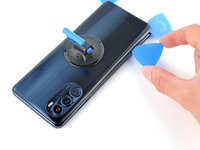
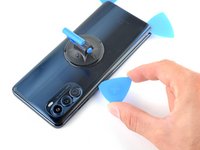
    • Insert a third opening pick into the bottom right corner.

    • Slide this opening pick along the left edge to slice the adhesive.

    • Don't worry about slicing under the camera bezel. It's separate from the back cover and will be removed later.

    • Leave the pick inserted in the top left corner to prevent the left edge from resealing.

  6. Motorola Moto G Stylus (2022) Camera Bezel Replacement, Slice the top adhesive: 6 단계, 이미지 2개 중 1개 Motorola Moto G Stylus (2022) Camera Bezel Replacement, Slice the top adhesive: 6 단계, 이미지 2개 중 2개
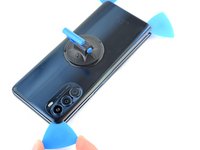
    • Insert a fourth pick into the top left corner.

    • Slide the pick to the top right corner to slice the top adhesive.

  7. Motorola Moto G Stylus (2022) Camera Bezel Replacement, Slice around the camera bezel: 7 단계, 이미지 1개 중 1개
    • Slide an opening pick between the camera bezel and the back cover.

    • The back cover's adhesive is particularly strong around the camera bezel.

    • Slide the opening pick around the camera bezel to separate the back cover from the frame.

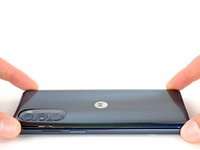
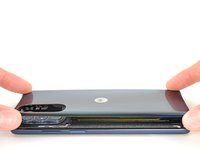
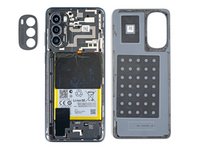
  8. Motorola Moto G Stylus (2022) Camera Bezel Replacement, Remove the back cover: 8 단계, 이미지 3개 중 1개 Motorola Moto G Stylus (2022) Camera Bezel Replacement, Remove the back cover: 8 단계, 이미지 3개 중 2개 Motorola Moto G Stylus (2022) Camera Bezel Replacement, Remove the back cover: 8 단계, 이미지 3개 중 3개
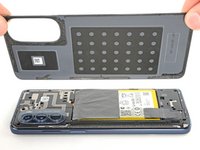
    • Grab and remove the back cover by lifting it away from the phone.

    • If your back cover is still sticking to the frame, slide the pick around the edges of the phone to slice through any remaining adhesive.

    • Reassembly notes:

    • To adhere the back cover with custom-cut adhesives, follow this guide.

    • To adhere the back cover with tape, follow this guide.

  9. Motorola Moto G Stylus (2022) Camera Bezel Replacement, Heat the camera bezel: 9 단계, 이미지 1개 중 1개
    • Heat an iOpener and apply it to the camera bezel for two minutes.

    • A hair dryer or heat gun may also be used, but be careful not to overheat the phone—the display and internal battery are both susceptible to heat damage.

  10. Motorola Moto G Stylus (2022) Camera Bezel Replacement, Slice the adhesive: 10 단계, 이미지 3개 중 1개 Motorola Moto G Stylus (2022) Camera Bezel Replacement, Slice the adhesive: 10 단계, 이미지 3개 중 2개 Motorola Moto G Stylus (2022) Camera Bezel Replacement, Slice the adhesive: 10 단계, 이미지 3개 중 3개
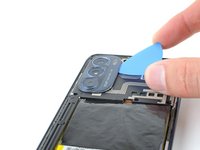
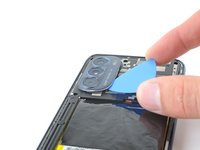
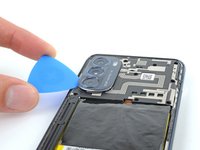
    • Insert an opening pick under the camera bezel.

    • Slide the pick around the perimeter of the bezel to slice the adhesive.

    • If it feels stuck, apply more heat to further loosen the adhesive.

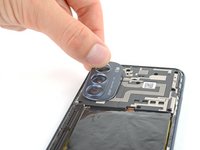
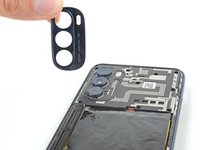
  11. Motorola Moto G Stylus (2022) Camera Bezel Replacement, Remove the camera bezel: 11 단계, 이미지 3개 중 1개 Motorola Moto G Stylus (2022) Camera Bezel Replacement, Remove the camera bezel: 11 단계, 이미지 3개 중 2개 Motorola Moto G Stylus (2022) Camera Bezel Replacement, Remove the camera bezel: 11 단계, 이미지 3개 중 3개
    • Grab and remove the camera bezel.

    • Reassembly notes:

    • This is a good point to test your phone before sealing it up. Follow this guide to perform a hardware test. Be sure to power your phone back down completely before you continue working.

    • To adhere the camera bezel with custom-cut adhesives, follow this guide.

    • To adhere the camera bezel with tape, follow this guide.

결론

To reassemble your device, follow these instructions in reverse order.

Repair didn’t go as planned? Try some basic troubleshooting, or ask our Answers community for help.

작성자

1다른 기여자 명과 함께

Clay Eickemeyer

회원 가입일: 09/19/22

96,090 평판

안내서 466개를 작성함

0가이드 댓글

댓글 쓰기

조회 통계:

지난 24시간: 0

지난 7일: 2

지난 30일: 5

전체 시간: 71