주요 콘텐츠로 건너뛰기

Nintendo NES Advantage Joystick Panel Replacement

필요한 것

  1. Nintendo NES Advantage Joystick Panel Replacement, Back Panel: 1 단계, 이미지 1개 중 1개
    • Remove the four sticky pads from the bottom of the device.

    • If the pads are stuck, use a spudger to remove them.

  2. Nintendo NES Advantage Joystick Panel Replacement: 2 단계, 이미지 2개 중 1개 Nintendo NES Advantage Joystick Panel Replacement: 2 단계, 이미지 2개 중 2개
    • Remove the six 8 mm screws from the bottom of the device with a Phillips #0 screwdriver.

    • Use your hands to pull the back panel away from the controller.

  3. Nintendo NES Advantage Joystick Panel Replacement, Joystick Panel: 3 단계, 이미지 1개 중 1개
    • Remove the four 12 mm screws from the small square panel on the right with a Phillips #0 screwdriver.

    • While removing the last (fourth) screw, apply downward pressure on the panel. This will make it easier to remove the last screw because of the joystick spring on the other side of this panel.

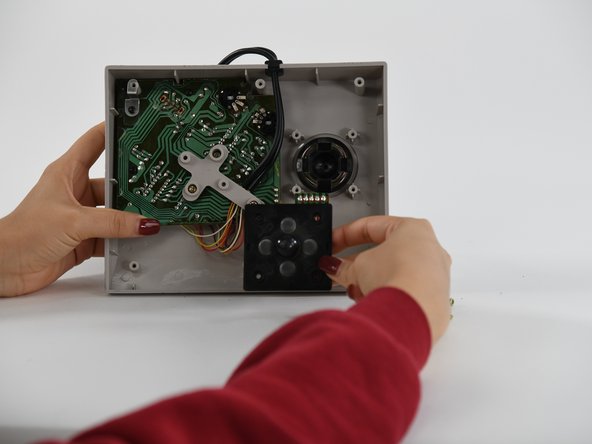
  4. Nintendo NES Advantage Joystick Panel Replacement: 4 단계, 이미지 2개 중 1개 Nintendo NES Advantage Joystick Panel Replacement: 4 단계, 이미지 2개 중 2개
    • Remove the small square panel.

    • This panel is connected with wires to the main circuit board. To replace the joystick panel, you will need to desolder the wires. To learn more about soldering, refer to our 연결부 납땜 및 납제거 방법 guide.

결론

To reassemble your device, follow these instructions in reverse order.

작성자

4다른 기여자 명과 함께

Alex E. Parker

회원 가입일: 09/01/22

100 평판

안내서 1개를 작성함

0가이드 댓글

댓글 쓰기

조회 통계:

지난 24시간: 0

지난 7일: 3

지난 30일: 22

전체 시간: 588