주요 콘텐츠로 건너뛰기

Oontz Angle 3 ULTRA Motherboard Replacement

필요한 것

  1. Oontz Angle 3 ULTRA Motherboard Replacement, Back Panel: 1 단계, 이미지 3개 중 1개 Oontz Angle 3 ULTRA Motherboard Replacement, Back Panel: 1 단계, 이미지 3개 중 2개 Oontz Angle 3 ULTRA Motherboard Replacement, Back Panel: 1 단계, 이미지 3개 중 3개
    이 단계에 사용된 도구:
    Tweezers
    $4.99
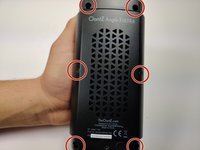
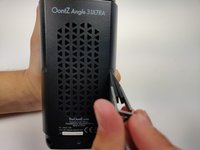
    • Remove the two black rubber sheaths around the edges of the speaker.

    • Under the symbol-marked sheath there is a white rubber covering for the buttons. Peel this away to reveal the panel underneath.

    • On two corners of its triangular face there is a small divot, which allows you to use your fingernails or a pair of tweezers to grip and peel away the covering.

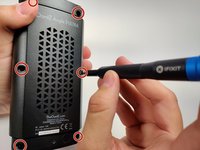
  2. Oontz Angle 3 ULTRA Motherboard Replacement: 2 단계, 이미지 3개 중 1개 Oontz Angle 3 ULTRA Motherboard Replacement: 2 단계, 이미지 3개 중 2개 Oontz Angle 3 ULTRA Motherboard Replacement: 2 단계, 이미지 3개 중 3개
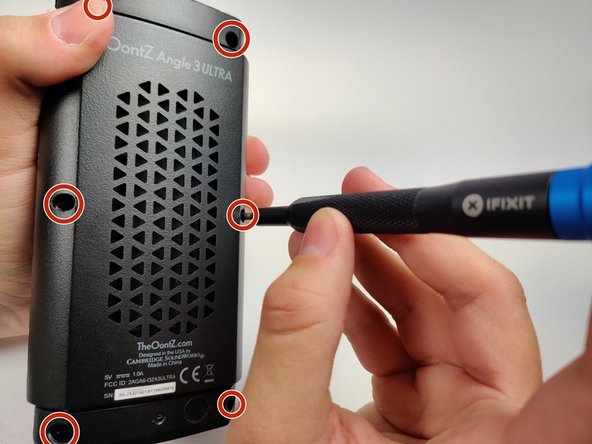
    • Use a JIS #0 screwdriver to remove the six screws to expose the motherboard.

  3. Oontz Angle 3 ULTRA Motherboard Replacement: 3 단계, 이미지 3개 중 1개 Oontz Angle 3 ULTRA Motherboard Replacement: 3 단계, 이미지 3개 중 2개 Oontz Angle 3 ULTRA Motherboard Replacement: 3 단계, 이미지 3개 중 3개
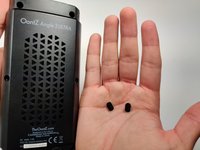
    • Using a pair of tweezers, pinch and pull the rubber fillings obstructing the screws.

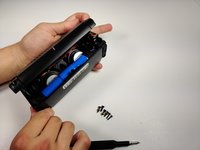
  4. Oontz Angle 3 ULTRA Motherboard Replacement: 4 단계, 이미지 3개 중 1개 Oontz Angle 3 ULTRA Motherboard Replacement: 4 단계, 이미지 3개 중 2개 Oontz Angle 3 ULTRA Motherboard Replacement: 4 단계, 이미지 3개 중 3개
    • Using a JIS #0 screwdriver, remove the 6 screws holding the backplate in.

    • Remove the back panel off of the device.

  5. Oontz Angle 3 ULTRA Motherboard Replacement, Motherboard: 5 단계, 이미지 1개 중 1개
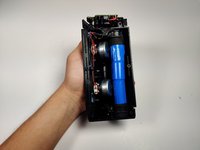
    • Using the spudger, remove the motherboard from the device.

    • Be cautious not to break the USB and 3.5mm auxiliary ports which are poking through the side of the device.

    • The microphone wires that connect to the back of the motherboard are very thin and may pull out. Do not worry, the following step is removing those wires.

  6. Oontz Angle 3 ULTRA Motherboard Replacement: 6 단계, 이미지 1개 중 1개
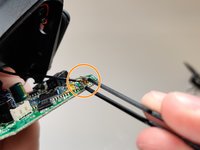
    • Using a soldering iron, remove microphone wires attached to the motherboard.

    • Melt the solder on the battery terminals on the motherboard and pull the wires through the backside of the board.

    • For more information on soldering, please visit the How to Solder and Desolder Connections guide.

  7. Oontz Angle 3 ULTRA Motherboard Replacement: 7 단계, 이미지 2개 중 1개 Oontz Angle 3 ULTRA Motherboard Replacement: 7 단계, 이미지 2개 중 2개
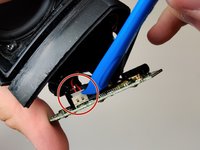
    • Using a spudger, disconnect the speaker bus female connector from the motherboard's male bus.

    • Remove the grounding wire from the back of the motherboard by gently pulling the metal connection directly away from the board.

  8. Oontz Angle 3 ULTRA Motherboard Replacement: 8 단계, 이미지 1개 중 1개
    • With the new motherboard, re-solder all of the wiring into their appropriate soldering locations and wiring harnesses.

    • Reassemble the speaker in reverse order.

결론

To reassemble your device, follow these instructions in reverse order.

다른 한 분이 해당 안내서를 완성하였습니다.

작성자

2다른 기여자 명과 함께

Ben Malone

회원 가입일: 01/16/20

355 평판

안내서 2개를 작성함

3가이드 댓글

Greetings.

Where can I find boards for my Angle 3 Ultra ??

Chris JOSEPH - 답글

can we have the parts of mother board so we as a beginner in electricians need this

Von Gerald Briones - 답글

댓글 쓰기

조회 통계:

지난 24시간: 2

지난 7일: 9

지난 30일: 20

전체 시간: 1,059