주요 콘텐츠로 건너뛰기

Razer Basilisk V3 LED Replacement

필요한 것

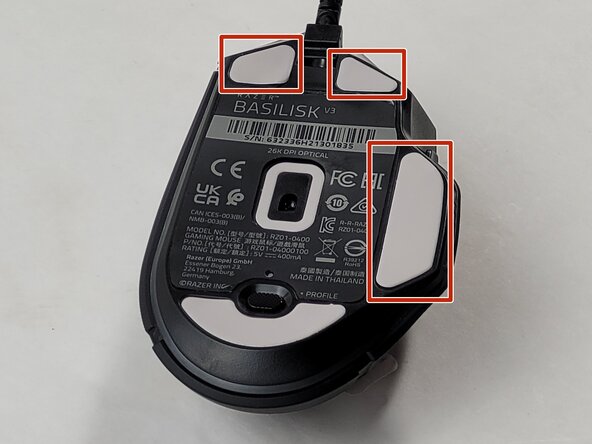
  1. Razer Basilisk V3 LED Replacement, Skates: 1 단계, 이미지 1개 중 1개
    • Locate the highlighted white skates on the bottom of the mouse.

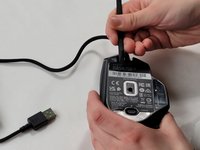
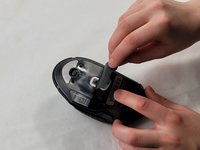
  2. Razer Basilisk V3 LED Replacement: 2 단계, 이미지 3개 중 1개 Razer Basilisk V3 LED Replacement: 2 단계, 이미지 3개 중 2개 Razer Basilisk V3 LED Replacement: 2 단계, 이미지 3개 중 3개
    • Heat the skate using a heat gun or hair dryer.

    • Using the pointy end of the spudger pry away a corner of the skate.

    • If the adhesive does not pull away easily, heat the skate more.

    • Once the corner of the skate comes free use the flat end of the spudger to peel off the rest of the skate.

    • Repeat these steps for each of the skates.

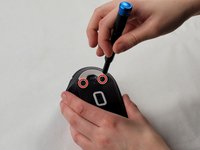
  3. Razer Basilisk V3 LED Replacement, Backplate: 3 단계, 이미지 1개 중 1개
    • Remove two 4.8 mm screws that were hidden under the front skates using a JIS #1 screwdriver.

    • Remove the single 4 mm screw beneath the thumb grip using a JIS #1 screwdriver.

  4. Razer Basilisk V3 LED Replacement: 4 단계, 이미지 3개 중 1개 Razer Basilisk V3 LED Replacement: 4 단계, 이미지 3개 중 2개 Razer Basilisk V3 LED Replacement: 4 단계, 이미지 3개 중 3개
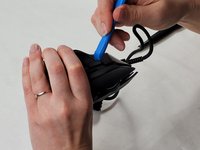
    • Heat the label gently with a heat gun or hair dryer.

    • Once the adhesive is loosened, use a spudger to peel off the label carefully, revealing two additional screws.

    • Remove the two 4.8 mm screws using a JIS #1 screwdriver.

  5. Razer Basilisk V3 LED Replacement: 5 단계, 이미지 3개 중 1개 Razer Basilisk V3 LED Replacement: 5 단계, 이미지 3개 중 2개 Razer Basilisk V3 LED Replacement: 5 단계, 이미지 3개 중 3개
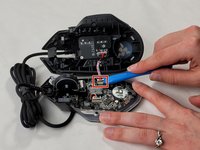
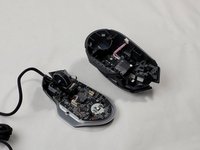
    • Carefully pry apart the mouse's top and bottom halves. Using the iFixit opening tool, start at one corner and work around the edge.

    • Be cautious of the clips that may break during this process.

    • Using a plastic opening tool, gently pry the connector apart by moving side to side to avoid bending the pins.

    • When reassembling, be mindful that the connector only fits one way, as shown in the pictures.

  6. Razer Basilisk V3 LED Replacement, Scroll Wheel Assembly: 6 단계, 이미지 3개 중 1개 Razer Basilisk V3 LED Replacement, Scroll Wheel Assembly: 6 단계, 이미지 3개 중 2개 Razer Basilisk V3 LED Replacement, Scroll Wheel Assembly: 6 단계, 이미지 3개 중 3개
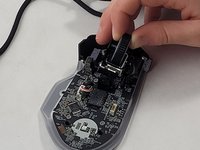
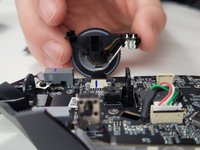
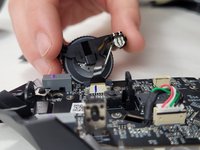
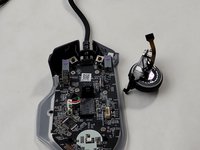
    • Use the flat end of the spudger to pop-out the scroll wheel assembly.

    • Make sure you are careful when removing the scroll wheel since it is still connected to the device with a ribbon cable. If you pull too hard the cable could break.

  7. Razer Basilisk V3 LED Replacement: 7 단계, 이미지 3개 중 1개 Razer Basilisk V3 LED Replacement: 7 단계, 이미지 3개 중 2개 Razer Basilisk V3 LED Replacement: 7 단계, 이미지 3개 중 3개
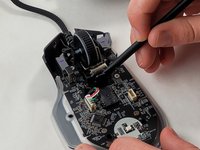
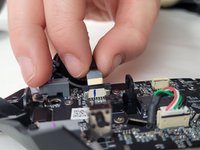
    • Pull up on the top half of the cable connector and pull the cable from the connector.

    • The connection pins on the wire face towards the scroll wheel assembly housing. When reassembling, make sure the connectors on the cable are facing the correct direction.

  8. Razer Basilisk V3 LED Replacement, LEDs: 8 단계, 이미지 1개 중 1개
    • Heat the soldering iron to middle high heat.

    • The soldering iron can burn when heated. Use caution when using. For more information on using a soldering iron, take a look at How to Solder and Desolder Connections

    • Inject a small amount of flux onto the LED solder connection you wish to replace.

    • Place the solder wick on top of the solder joint.

    • Press the soldering iron on top of the solder wick on top of the solder joint, and press until you see the solder come through the wick.

    • Once you see the solder through the wick (it should look silver and not copper colored) pull the wick off the solder joint and remove the soldering iron.

    • Repeat on the 3 other solder joints for the LED.

    • Remove the LED with tweezers.

결론

To reassemble your device, follow these instructions in reverse order.

작성자

1다른 기여자 명과 함께

Mary Quin

회원 가입일: 03/20/24

288 평판

안내서 2개를 작성함

UMass Dartmouth, Team 1-2, Santin Spring 2024 UMass Dartmouth, Team 1-2, Santin Spring 2024 회원

UMASSD-SANTIN-S24S1G2

3 회원들

안내서 15개를 작성함

0가이드 댓글

댓글 쓰기

조회 통계:

지난 24시간: 0

지난 7일: 9

지난 30일: 56

전체 시간: 630