소개
Use this guide to replace the battery in your Galaxy Note.
If your battery is swollen, take appropriate precautions.
필요한 것
-
-
Pry with a plastic opening tool, or your fingernail, in the divot to the right of the rear-facing camera, near the volume rocker.
-
-
-
-
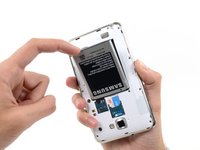
Insert your finger in the notch of the battery compartment.
-
Press the battery toward the rear facing camera while pulling outward.
-



To reassemble your device, follow these instructions in reverse order.
다른 10명이 해당 안내서를 완성하였습니다.



1가이드 댓글
Where can I find a cheap, yet powerful battery as a replacement for the old? How do I tell if the device needs a new battery or if the charging port needs to be repaired in its entirety?
