주요 콘텐츠로 건너뛰기

Vizio SmartCast Tablet Remote XR6M Micro-USB Port Replacement

필요한 것

  1. Vizio SmartCast Tablet Remote XR6M Micro-USB Port Replacement, Micro-USB Port: 1 단계, 이미지 1개 중 1개
  2. Vizio SmartCast Tablet Remote XR6M Micro-USB Port Replacement: 2 단계, 이미지 2개 중 1개 Vizio SmartCast Tablet Remote XR6M Micro-USB Port Replacement: 2 단계, 이미지 2개 중 2개
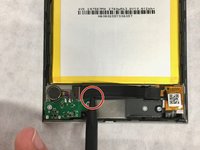
    • Insert the tip of the nylon spudger under the black flap, and pull upwards toward yourself to disconnect it.

    • Be careful, as the flap can easily break off.

  3. Vizio SmartCast Tablet Remote XR6M Micro-USB Port Replacement: 3 단계, 이미지 3개 중 1개 Vizio SmartCast Tablet Remote XR6M Micro-USB Port Replacement: 3 단계, 이미지 3개 중 2개 Vizio SmartCast Tablet Remote XR6M Micro-USB Port Replacement: 3 단계, 이미지 3개 중 3개
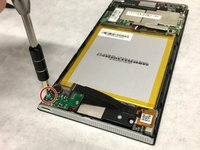
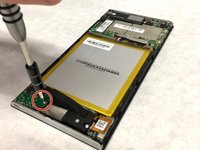
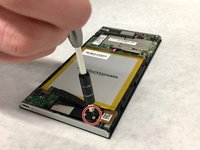
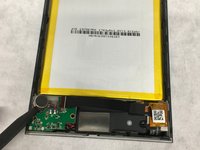
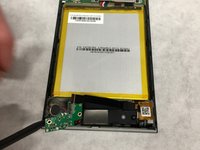
    • Using the T-5 bit, unscrew the three 5mm screws, two attached to the green board, one attached to the black board.

  4. Vizio SmartCast Tablet Remote XR6M Micro-USB Port Replacement: 4 단계, 이미지 3개 중 1개 Vizio SmartCast Tablet Remote XR6M Micro-USB Port Replacement: 4 단계, 이미지 3개 중 2개 Vizio SmartCast Tablet Remote XR6M Micro-USB Port Replacement: 4 단계, 이미지 3개 중 3개
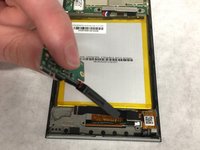
    • Using the nylon spudger, remove the silver cylindrical component followed by the green then black components

    • Be careful not to break the wires that are holding the three components together.

결론

To reassemble your device, follow these instructions in reverse order.

작성자

2다른 기여자 명과 함께

tate campbell

회원 가입일: 09/17/18

439 평판

안내서 3개를 작성함

Washington State, Team S2-G3, Hope Fall 2018 Washington State, Team S2-G3, Hope Fall 2018 회원

WSU-HOPE-F18S2G3

4 회원들

안내서 3개를 작성함

1가이드 댓글

Is there a way to purchase a replacement battery?

Gasman - 답글

댓글 쓰기

조회 통계:

지난 24시간: 0

지난 7일: 1

지난 30일: 10

전체 시간: 502