주요 콘텐츠로 건너뛰기

iMac Intel 17" Optical Drive Replacement

단지 전제 조건
이 가이드는 전제 조건 전용 가이드입니다! 이 가이드는 다른 절차의 일부이며 단독으로 사용할 수 없습니다.

필요한 것

  1. iMac Intel 17" Optical Drive Replacement, Optical Drive: 1 단계, 이미지 1개 중 1개
    • Remove the two 7 mm T10 Torx screws securing the optical drive clip to the logic board.

  2. iMac Intel 17" Optical Drive Replacement: 2 단계, 이미지 1개 중 1개
    • Remove the optical drive clip.

  3. iMac Intel 17" Optical Drive Replacement: 3 단계, 이미지 1개 중 1개
    • Pull the optical drive thermal sensor cable connector away from its socket on the logic board.

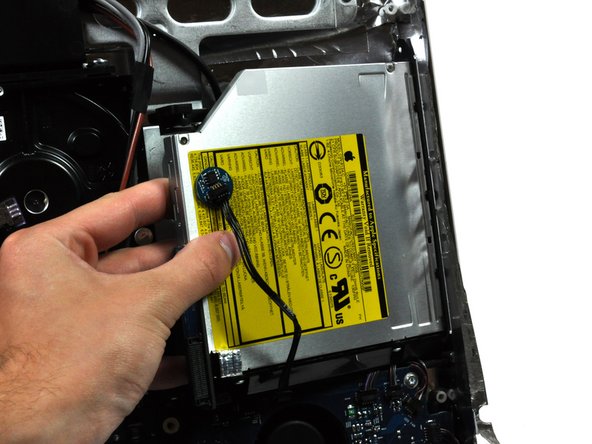
  4. iMac Intel 17" Optical Drive Replacement: 4 단계, 이미지 2개 중 1개 iMac Intel 17" Optical Drive Replacement: 4 단계, 이미지 2개 중 2개
    • Squeeze the two optical drive bracket ears together while pulling the drive toward yourself.

    • It may be helpful to hold the logic board down near the optical drive connector when pulling the drive toward yourself to avoid both components lifting together.

    • Pull the optical drive away from the side of the rear panel and remove it from the iMac.

결론

To reassemble your device, follow these instructions in reverse order.

다른 한 분이 해당 안내서를 완성하였습니다.

작성자

3다른 기여자 명과 함께

Walter Galan

706,346 평판

안내서 1,203개를 작성함

0가이드 댓글

댓글 쓰기

조회 통계:

지난 24시간: 0

지난 7일: 0

지난 30일: 0

전체 시간: 1,779