주요 콘텐츠로 건너뛰기

iPhone 7 Plus SIM Card Replacement

필요한 것

  1. iPhone 7 Plus SIM Card Replacement, SIM Card: 1 단계, 이미지 2개 중 1개 iPhone 7 Plus SIM Card Replacement, SIM Card: 1 단계, 이미지 2개 중 2개
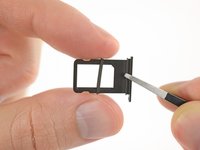
    • Insert a SIM card eject tool or a paperclip into the small hole in the SIM card tray.

    • Press firmly to eject the tray.

  2. iPhone 7 Plus SIM Card Replacement: 2 단계, 이미지 3개 중 1개 iPhone 7 Plus SIM Card Replacement: 2 단계, 이미지 3개 중 2개 iPhone 7 Plus SIM Card Replacement: 2 단계, 이미지 3개 중 3개
    • Remove the SIM card tray from the iPhone.

    • The SIM card will fall out of the tray easily.

    • When reinserting the SIM card, ensure that it is in the proper orientation relative to the tray.

    • A thin rubber gasket around the SIM tray provides water and dust protection. If this gasket is damaged or missing, replace the gasket to protect your iPhone's internal components.

결론

To reassemble your device, follow these instructions in reverse order.

다른 20명이 해당 안내서를 완성하였습니다.

작성자

1다른 기여자 명과 함께

Jeff Suovanen

회원 가입일: 08/06/13

447,012 평판

안내서 259개를 작성함

iFixit iFixit 회원

Staff

123 회원들

안내서 23,589개를 작성함

0가이드 댓글

댓글 쓰기

조회 통계:

지난 24시간: 5

지난 7일: 31

지난 30일: 131

전체 시간: 31,616