주요 콘텐츠로 건너뛰기

iView-776TPCII Wi-Fi Antenna Replacement

필요한 것

  1. iView-776TPCII Wi-Fi Antenna Replacement, Rear Panel: 1 단계, 이미지 3개 중 1개 iView-776TPCII Wi-Fi Antenna Replacement, Rear Panel: 1 단계, 이미지 3개 중 2개 iView-776TPCII Wi-Fi Antenna Replacement, Rear Panel: 1 단계, 이미지 3개 중 3개
    • Before disassembling your device, make sure that the power is completely turned off.

    • Use the plastic opening tool to release the clips holding the rear panel of the device onto the front section.

    • The clips may take some pressure before releasing.

    • Continue around the entire device until all of the clips have been released.

  2. iView-776TPCII Wi-Fi Antenna Replacement: 2 단계, 이미지 2개 중 1개 iView-776TPCII Wi-Fi Antenna Replacement: 2 단계, 이미지 2개 중 2개
    • Use a spudger to carefully free the speaker from it's housing on the back panel.

    • Place the spudger between the speaker and the rear panel. Use a prying motion to remove the component.

    • Be careful not to apply an over amount of force. If care is not taken, the speaker could break under the pressure.

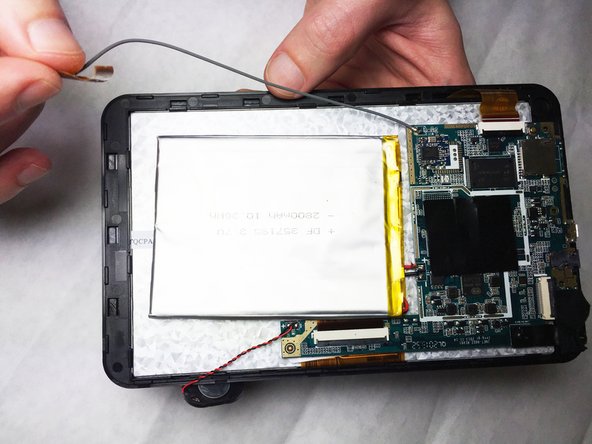
  3. iView-776TPCII Wi-Fi Antenna Replacement, Wi-Fi Antenna: 3 단계, 이미지 2개 중 1개 iView-776TPCII Wi-Fi Antenna Replacement, Wi-Fi Antenna: 3 단계, 이미지 2개 중 2개
    • Detach the end of the Wi-Fi antenna from the tape on the edge of the shell.

  4. iView-776TPCII Wi-Fi Antenna Replacement: 4 단계, 이미지 1개 중 1개
    이 단계에 사용된 도구:
    Tweezers
    $4.99
    • Use the Portable Soldering Iron tool to heat the lead coming from the Wi-Fi antenna to the logic board, thereby breaking the connection.

    • For help on soldering, refer to the iFixit "How To Solder and Desolder Connections" technique guide as necessary.

    • Once heated, use tweezers to pull the wire free from its connection.

결론

To reassemble your device, follow these instructions in reverse order.

작성자

4다른 기여자 명과 함께

Cory Gratzer

회원 가입일: 09/16/15

586 평판

안내서 5개를 작성함

IUPUI, Team 2-2, Baechle Fall 2015 IUPUI, Team 2-2, Baechle Fall 2015 회원

IUPUI-BAECHLE-F15S2G2

3 회원들

안내서 12개를 작성함

0가이드 댓글

댓글 쓰기

조회 통계:

지난 24시간: 0

지난 7일: 0

지난 30일: 3

전체 시간: 535