
주요 콘텐츠로 건너뛰기

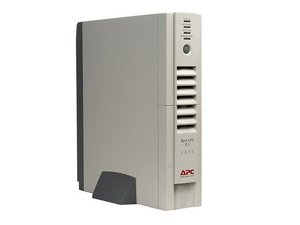
The APC RS 1000 is an uninterruptible power supply capable of delivering 600 Watts.

Overload alarm lights and sound

My ups, after 5 years of continuous operation shows the overload's light .

I unplugged the PC and I replaced the battery but I have not solved the problem.

Then I opened it to see if there are components that are burned or leak but nothing.

To be sure I replaced the cooling fan but nothing has changed.

Can anyone give me some tips?

Thank you very much.

답변되었습니다! 답변 보기 저도 같은 문제가 있습니다

좋은 질문입니까?

점수 5
댓글 1개

Hi, i had the same problem twice...!!!

My battery was ok, everything was ok but

the beep keep going on, for overload...

Both times i fixed doing these steps...

- Turn off the unit

- Flip over the unit

- Open the battery-cap and turn the power on

- Green Light is flashing

- Try Now (with the green light flashing) to disconnect the battery...

- Now it should be ON with the Empty battery light on (Red light)

- Connect again the battery as it is...

Now it should be ok...!!!

Good Luck...

댓글 달기

답변 5개

선택된 해법

Thanks to all. I have not solved the problem. I replaced the old ups with a new one.

이 답변이 도움이 되었나요?

점수 2
댓글 달기
가장 유용한 답변

Roberto, If it alarms, even with nothing plugged in, then it is possible that one of the MOSFET on your mainboard has failed.

이 답변이 도움이 되었나요?

점수 4

댓글 3개:

metal–oxide–semiconductor field-effect transistor (MOSFET)

http://en.wikipedia.org/wiki/MOSFET

Did you solve the problem? Same problem here, 4 years later..

daigoph@gmail.com

Green light not so always yellow light and 5 Second deep alarm

댓글 달기

Hi, i had the same problem twice...!!!

My battery was ok, everything was ok but

the beep keep going on, for overload...

Both times i fixed doing these steps...

- Turn off the unit

- Flip over the unit

- Open the battery-cap and turn the power on

- Green Light is flashing

- Try Now (with the green light flashing) to disconnect the battery...

- Now it should be ON with the Empty battery light on (Red light)

- Connect again the battery as it is...

Now it should be ok...!!!

Good Luck...

이 답변이 도움이 되었나요?

점수 2

댓글 1개:

Thank you but I replaced the old ups with a new one. Yours sincerely.

댓글 달기

I too facing the same problem....battery charging process is fine...but when i turn on the inverter it trips and shows overload and keep continuosly beep beeps....pls help me to solve this problem....i expecting board level service suggestions ...thank you

이 답변이 도움이 되었나요?

점수 1
댓글 달기

My problem solved with removing the all cables also power cable wait 5 minute & connect cable again it's working.

이 답변이 도움이 되었나요?

점수 0
댓글 달기

답변을 추가하세요

Roberto 영원히 감사할 것입니다.
조회 통계:

지난 24시간: 1

지난 7일: 10

지난 30일: 83

전체 시간: 38,774


