
주요 콘텐츠로 건너뛰기
수리 커뮤니티 가입 - 계정 만들기

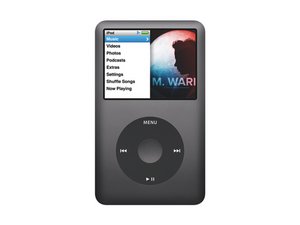
모델 번호 A1238 / 80, 120, 또는160GB 하드 드라이브 / 검정색 또는 은색 금속 외형

select button (centre button) does not register.

Has anyone found a solution? Ive done the exact same thing. I booted up into language select, click wheel works as i can scroll, but the select button (centre button) does not register. All connectors are tight and i can feel/hear it click but it technically will not register.

이 질문에 답하기 저도 같은 문제가 있습니다

좋은 질문입니까?

점수 2
댓글 달기

답변 4개

가장 유용한 답변

Ernest, if you are certain that your button depresses the switch, try to assemble your iPod without the center button. Depress the switch manually by using a pencil with the eraser side pushing the switch. That way you will know if it is the click wheel, or the logic board. The other thing you can do is measure the switch itself. Attach the leads from your multimeter to the bottom two contacts, you should see that the switch does have some resistance, and total continuity when depressed. If the switch itself checks out okay, you may have to replace the logic board. Hope this helps, good luck

Block Image
Block Image

이 답변이 도움이 되었나요?

점수 1

댓글 8개:

This is a brand new one. in fact I got two brand new logic board and its the same issue. But i will try the multi meter and report back.

thank you

you did not mention this in your original question. Does your center button reach the switch? If so, try a new click wheel.

yes it does i can infact feel the button click the switch on the motherboard. just a thought "dosent the click wheel have nothing to do with the click button because it looks like the click button is separate from the click wheel"

Yes, and no. remember how the click wheel a lot of times works in connection with the center button. i.e. when you place your iPod in disk mode or diagnostic mode. BTW have you tried the diagnostics mode and see if it gives you any errors.

Yes, and no. remember how the click wheel a lot of times works in connection with the center button. i.e. when you place your iPod in disk mode or diagnostic mode. BTW have you tried the diagnostics mode and see if it gives you any errors.

댓글 3개 더보기

댓글 달기

oldturkey03 was right! figured out it was the scroll wheel. When I put the iPod back together the scroll wheel connector was not flush on logic board. The scroll wheel functioned perfectly but none of the buttons would work. Did multi meter test and got continuity. So I knew I was on the right track. Applied pressure to scroll wheel connector with ribbon plugged in. And what do ya know! Buttons started working. Double check that scroll wheel connector is flat on logic board. Adhesive wears out over time. Let me know if that helps! Best of luck!

이 답변이 도움이 되었나요?

점수 1

댓글 1개:

Tried everything and restored it 4 times, select button won't work!!! Which part of it is supposed to be flushed? The thing was working this morning, just upgraded it to SSD memory and now the select button is giving me sh*t.

댓글 달기

Sorry, this isn't an answer, but a vote of sympathy. I have exactly the same problem! New logic board, and the crazy thing is I think it worked before I restored the hard drive... Could it be a software thing??

이 답변이 도움이 되었나요?

점수 0

댓글 4개:

Have you tried a new click wheel?

Thanks for your answer old turkey.

I haven't, but the scrolling function and buttons of the click wheel work fine. It's just the select button... I've yet to test it with a multi-meter. The button clicks and looks in place and in tact, it just doesn't seem to send any messages to the logic board. Grrr... in my desperation I'm wondering if an ipod remote control would work.

: )

I'd replace the clickwheel and see what you get. It'll be cheaper than getting a remote:-) unless you already have it.

Click-wheel replacement same story, still no go with the select button. And the WIERD thing is that it doesn't work with a remote control either! Very odd. Is there any possibility it's a software problem do you think? Two restores with no luck. It has me completely baffled.

댓글 달기

HI there. I'm having the same problem. 9 times out of 10 my Center button won't give a signal.

이 답변이 도움이 되었나요?

점수 0

댓글 1개:

same problem here.....

댓글 달기

답변을 추가하세요

Ernest 영원히 감사할 것입니다.
조회 통계:

지난 24시간: 1

지난 7일: 6

지난 30일: 24

전체 시간: 2,849



