주요 콘텐츠로 건너뛰기
수리 커뮤니티 가입 - 계정 만들기

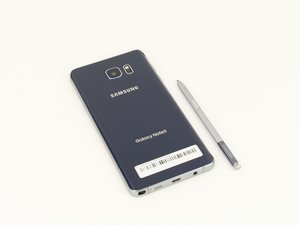
Samsung에서 제조한 Samsung Galaxy Note 5는 (Note5로 불림) 스타일러스를 탑재한 phablet/패블릿 스타일 휴대폰입니다, 2015년 8월 출시.

bootlooped note 5 data pull

I found my note 5 caught in a boot loop after I woke up this morning. I've been doing everything to try and get it out but no luck. I am willing to reset my phone if I have my data though, so I was wondering if there is any software I could download which would let me pull data (such as pictures, videos, music etc) while the phone is stuck in a loop. I can power it off using recovery settings. Clearing the cache doesn't help. I'm not even sure if resetting would solve the looping issue but any info would be much appreciated, thanks!

답변되었습니다! 답변 보기 저도 같은 문제가 있습니다

좋은 질문입니까?

점수 0
댓글 달기

답변 2개

선택된 해법

You need to be able to flash a custom recovery then use the file system mtp mounting to computer then you can read the data. System and data partition should be mounted in system recovery.

You might even be able to just get the phone working again by reflash the firmware via Odin.

How to flash android firmware: http://updato.com/how-to/how-to-install-...

I usually use TWRP or clockworkmod recovery Odin flashable to do data recovery on firmware that refuses to boot without factory reset (and or firmware reflash).

이 답변이 도움이 되었나요?

점수 3

댓글 4개:

So I flashed new firmware onto it and it is still looping. Should I try flashing an older version of the firmware or something? What do you suggest?

Then you need to flash a custom recovery so that you can use MTP mode to backup contacts and photos while in a custom recovery.

https://twrp.me/devices/samsunggalaxynot...

I tried flashing TWRP and It keeps failing, I also get an error on my download screen(on the phone) saying the FAP lock is on? Thanks for your help!

Oh.. If you have FRP lock then you are literally out of luck for data recovery. I'm afraid you will have to do a wipe data / factory reset in recovery mode and lose all your data.

If you can still get into the recovery menu and do wipe-data then do it. Otherwise reflash firmware again and wipe data / factory reset in recovery mode.

댓글 달기

If you can get the phone into recovery mode, connect it to a PC with the adb tool.

The command 'adb pull <file>' can grab <files> from the phone.

이 답변이 도움이 되었나요?

점수 0

댓글 3개:

Could you give me an example of how I could do this to pull music for example and which tool would be the easiest to use? Also, I know I had developer tools enabled on my phone but I'm not sure if USB debugging was enabled. Thanks!

I followed that tutorial but I kept on getting an error that it couldn't find the phone, I might be because the phone isn't in USB debugging mode but I have no way to change that.

댓글 달기

답변을 추가하세요

Robel Efrem 영원히 감사할 것입니다.
조회 통계:

지난 24시간: 1

지난 7일: 1

지난 30일: 13

전체 시간: 3,264
