
주요 콘텐츠로 건너뛰기

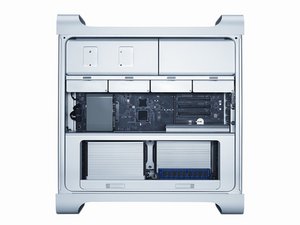
2009년 3월에 소개된 The Mac Pro (Early 2009)는 Intel Nehalem 아키텍처를 Apple의 전문가용 데스크탑 라인에 도입하였으며 미묘하게 재설계된 내부는 2010 및 2012 CPU 업데이트를 통해 소개되었습니다.

PCIe slots not working

I have a Mac Pro 2012 5,1. When I upgraded to Sierra a couple years ago it seems PCIe slots 3 & 4 stopped working. I later went to High Sierra and still those slots are not working. How can I fix this?

답변되었습니다! 답변 보기 저도 같은 문제가 있습니다

좋은 질문입니까?

점수 0
댓글 달기

답변 1개

선택된 해법

Boot from your original system installation DVD. Now see if the slots work. If so then you know it’s a software issue. If the issue persists you know it’s a hardware issue. This is one I have not see. I would blow it out very well with canned air, these things suck in a lot of dirt.

If the slots work with the DVD, it’s a software issue. Now start up from your - wait a minute -Just how did you get it to High Sierra in the first place? When you went to Sierra did you do the firmware update?

이 답변이 도움이 되었나요?

점수 2

댓글 2개:

I have no boot up DVD. It did not come with one. It wasn't purchased from Mac, but through a third party, B&H Photo.

I am guessing it's a firmware issue. As I recall now, when I was updating to Sierra we lost power. I went back to the update from start again the next day.

When you do the firmware update in Sierra, it shuts down on its own. You then have to press and hold the power on button for several seconds until it starts flashing rapidly. You will then get a long tone and an oval progress bar will appear on the screen. That is your firmware being updated. If this has not happened it wouldn't hurt to try it.

댓글 달기

답변을 추가하세요

Tom Rovak 영원히 감사할 것입니다.
조회 통계:

지난 24시간: 0

지난 7일: 0

지난 30일: 4

전체 시간: 395