

주요 콘텐츠로 건너뛰기

First-generation Apple iPad with Wi-Fi, available with 16, 32, or 64 GB. Model Number A1219. Repairs are straightforward and do not require heat.

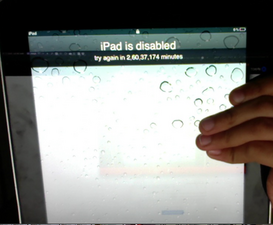
iPad is disabled try again in 26,037,178 minutes

Okay so I have this iPad which I charged up today and when I unlocked it came

iPad is disabled try again in 26,037,178 minutes

well what can I do as it is not connected to the internet, I cant erase the data and I don’t have the computer which I backed it up onto.
Block Image

On the image you can tell its on ios 5 and does not have internet connectivity

Block Image

.

I have seen all the posts about it but still I can’t fix it

Please help

이 질문에 답하기 저도 같은 문제가 있습니다

좋은 질문입니까?

점수 0
댓글 2개

Are you wanting the data off of it?

Nope I don't want that

댓글 달기

답변 2개

가장 유용한 답변

There’s no easy way to remove it unfortunately - if it was that easy we’d have stolen iOS devices all over the market.

Your only option really is to restore it…

이 답변이 도움이 되었나요?

점수 1
댓글 달기

Hi

Connect it to any computer with itunes. Hold down the power button and home button at the same time. Once the screen turns black let go of power button and keep holding the home button for another 10 seconds. Your iTunes will detect a device in recovery mode. Hit restore and you should be set. Please be aware this will erase all data in your iPad and will require apple id and password when the restore is finished.

이 답변이 도움이 되었나요?

점수 0

댓글 2개:

Yes this might work but I am scared to do this because this iPad has been in cold storage for 2 years and it has a lot of important things in it so can I recover the data? Also the iPad is not being detected in iTunes

One the iPad is disabled I don't think there's a way to get the data back sorry

댓글 달기

답변을 추가하세요

itsnotoranage 영원히 감사할 것입니다.
조회 통계:

지난 24시간: 0

지난 7일: 6

지난 30일: 14

전체 시간: 825