
주요 콘텐츠로 건너뛰기
수리 커뮤니티 가입 - 계정 만들기

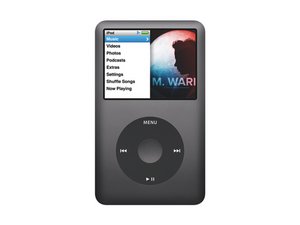
모델 번호 A1238 / 80, 120, 또는160GB 하드 드라이브 / 검정색 또는 은색 금속 외형

Click wheel not playing/pausing

The click wheel on iPod Classic (Late 2009) doesn't work for playing or pausing. To get it to play I have to press it 20-30 times just below the play/pause symbols. Once it's playing I just remove the headphone jack to pause playback. All other functions work properly forward/back, Menu, volume control, and the center button. Unit charges normally, and is recognized by iTunes/Windows. Is it just the click wheel that needs replacing?

이 질문에 답하기 저도 같은 문제가 있습니다

좋은 질문입니까?

점수 -1
댓글 달기

답변 1개

가장 유용한 답변

place your iPod in diagnostic mode "Menu + Center >Previous + Center" In the diagnostic mode it allows you to test your click wheel. You can check on it. At this point I would think that if everything else works the way it is supposed to, just change the click wheel. Not a terrible job, bit of a bear to open the iPod, and cost effective. Once you change it re-evalaute and see what you got. Make sure that when you do change it, take a look at the micro switches on the logic board. They have to correspond with the click wheel.

iPod Classic Click Wheel Replacement

이 답변이 도움이 되었나요?

점수 3

댓글 4개:

Thanks for your reply. Looking at slide 34 in the instructions I see the micro switches you are talking about. Now I'm wondering if the micro switch that corresponds with the play/pause button is bad. Can I test that somehow?

You can check the switch through the diagnostics as well, It does give you the option. You could also disassemble the iPod and test the switch with a multimeter.

The keypad button test fails on the Pause/Play Key. Once I figure out how to get out of this testing I will try the Wheel test.

okay sounds good. let us know

댓글 달기

답변을 추가하세요

mike marcott 영원히 감사할 것입니다.
조회 통계:

지난 24시간: 0

지난 7일: 0

지난 30일: 2

전체 시간: 11,480
